MyBatis-Plus#
[TOC]
课程了解#
- 了解 MyBatis-Plus
- 整合 MyBatis-Plus
- 通用 CRUD
- MyBatis-Plus 的配置
- 条件构造器
- ActiveRecord
- Oracle 主键 Sequence
- Mybatis-Plus的插件
- 自动填充功能
- 逻辑删除
- 通用枚举
- 代码生成器
- MybatisX 快速开发插件
了解 MyBatis-Plus#
Mybatis-Plus介绍#
MyBatis-Plus(简称 MP)是一个 MyBatis 的增强工具,在 MyBatis 的基础上只做增强不做改变,为简化开发、提高 效率而生。 官网:https://mybatis.plus/ 或 https://mp.baomidou.com/
愿景 我们的愿景是成为 MyBatis 最好的搭档,就像 魂斗罗 中的 1P、2P,基友搭配,效率翻倍。
代码以及文档#
文档地址:https://mybatis.plus/guide/
源码地址:https://github.com/baomidou/mybatis-plus
- 无侵入:只做增强不做改变,引入它不会对现有工程产生影响,如丝般顺滑
- 损耗小:启动即会自动注入基本 CURD,性能基本无损耗,直接面向对象操作 强大的 CRUD
- 操作:内置通用 Mapper、通用 Service,仅仅通过少量配置即可实现单表大部分 CRUD 操作, 更有强大的条件构造器,满足各类使用需求 支持 Lambda
- 形式调用:通过 Lambda 表达式,方便的编写各类查询条件,无需再担心字段写错
- 支持多种数据库:支持 MySQL、MariaDB、Oracle、DB2、H2、HSQL、SQLite、Postgre、 SQLServer2005、SQLServer 等多种数据库
- 支持主键自动生成:支持多达 4 种主键策略(内含分布式唯一 ID 生成器 - Sequence),可自由配置,完美解 决主键问题
- 支持 XML 热加载:Mapper 对应的 XML 支持热加载,对于简单的 CRUD 操作,甚至可以无 XML 启动
- 支持 ActiveRecord 模式:支持 ActiveRecord 形式调用,实体类只需继承 Model 类即可进行强大的 CRUD 操 作
- 支持自定义全局通用操作:支持全局通用方法注入( Write once, use anywhere )
- 支持关键词自动转义:支持数据库关键词(order、key……)自动转义,还可自定义关键词
- 内置代码生成器:采用代码或者 Maven 插件可快速生成 Mapper 、 Model 、 Service 、 Controller 层代码, 支持模板引擎,更有超多自定义配置等您来使用
- 内置分页插件:基于 MyBatis 物理分页,开发者无需关心具体操作,配置好插件之后,写分页等同于普通 List 查询
- 内置性能分析插件:可输出 Sql 语句以及其执行时间,建议开发测试时启用该功能,能快速揪出慢查询
- 内置全局拦截插件:提供全表 delete 、 update 操作智能分析阻断,也可自定义拦截规则,预防误操作
- 内置 Sql 注入剥离器:支持 Sql 注入剥离,有效预防 Sql 注入攻击
Mybatis-Plus是由baomidou(苞米豆)组织开发并且开源的,目前该组织大概有30人左右。
码云地址:https://gitee.com/organizations/baomidou
快速开始#
对于Mybatis整合MP有常常有三种用法,分别是Mybatis+MP、Spring+Mybatis+MP、Spring Boot+Mybatis+MP。
创建数据库以及表#
 1
 2
 3
 4
 5
 6
 7
 8
 9
10
11
12
13
14
15
16
17
18
19
20
21
22
23
24
| -- 创建库
create database mp;
-- 创建测试表
use mp;
CREATE TABLE `tb_user` (
`id` bigint(20) NOT NULL AUTO_INCREMENT COMMENT '主键ID',
`user_name` varchar(20) NOT NULL COMMENT '用户名',
`password` varchar(20) NOT NULL COMMENT '密码',
`name` varchar(30) DEFAULT NULL COMMENT '姓名',
`age` int(11) DEFAULT NULL COMMENT '年龄',
`email` varchar(50) DEFAULT NULL COMMENT '邮箱',
PRIMARY KEY (`id`)
) ENGINE=InnoDB AUTO_INCREMENT=1 DEFAULT CHARSET=utf8;
-- 插入测试数据
INSERT INTO `tb_user` (`id`, `user_name`, `password`, `name`, `age`, `email`) VALUES
('1', 'zhangsan', '123456', '张三', '18', 'test1@itcast.cn');
INSERT INTO `tb_user` (`id`, `user_name`, `password`, `name`, `age`, `email`) VALUES
('2', 'lisi', '123456', '李四', '20', 'test2@itcast.cn');
INSERT INTO `tb_user` (`id`, `user_name`, `password`, `name`, `age`, `email`) VALUES
('3', 'wangwu', '123456', '王五', '28', 'test3@itcast.cn');
INSERT INTO `tb_user` (`id`, `user_name`, `password`, `name`, `age`, `email`) VALUES
('4', 'zhaoliu', '123456', '赵六', '21', 'test4@itcast.cn');
INSERT INTO `tb_user` (`id`, `user_name`, `password`, `name`, `age`, `email`) VALUES
('5', 'sunqi', '123456', '孙七', '24', 'test5@itcast.cn');
|
导入Maven依赖#
 1
 2
 3
 4
 5
 6
 7
 8
 9
10
11
12
13
14
15
16
17
18
19
20
21
22
23
24
25
26
27
28
29
30
31
32
33
34
35
36
37
| <dependencies>
<!-- mybatis-plus插件依赖 -->
<dependency>
<groupId>com.baomidou</groupId>
<artifactId>mybatis-plus</artifactId>
<version>3.4.2</version>
</dependency>
<!-- MySql -->
<dependency>
<groupId>mysql</groupId>
<artifactId>mysql-connector-java</artifactId>
<version>5.1.47</version>
</dependency>
<!-- 连接池 -->
<dependency>
<groupId>com.alibaba</groupId>
<artifactId>druid</artifactId>
<version>1.0.11</version>
</dependency>
<!--简化bean代码的工具包-->
<dependency>
<groupId>org.projectlombok</groupId>
<artifactId>lombok</artifactId>
<optional>true</optional>
<version>1.18.4</version>
</dependency>
<dependency>
<groupId>junit</groupId>
<artifactId>junit</artifactId>
<version>4.12</version>
</dependency>
<dependency>
<groupId>org.slf4j</groupId>
<artifactId>slf4j-log4j12</artifactId>
<version>1.6.4</version>
</dependency>
</dependencies>
|
Mybatis + MP#
下面演示,通过纯Mybatis与Mybatis-Plus整合。
创建子Module#
log4j.properties:
1
2
3
4
5
| log4j.rootLogger=DEBUG,A1
log4j.appender.A1=org.apache.log4j.ConsoleAppender
log4j.appender.A1.layout=org.apache.log4j.PatternLayout
log4j.appender.A1.layout.ConversionPattern=[%t] [%c]-[%p] %m%n
|
Mybatis实现查询User#
第一步,编写mybatis-config.xml文件:
 1
 2
 3
 4
 5
 6
 7
 8
 9
10
11
12
13
14
15
16
17
18
19
20
| <?xml version="1.0" encoding="UTF-8" ?>
<!DOCTYPE configuration
PUBLIC "-//mybatis.org//DTD Config 3.0//EN"
"http://mybatis.org/dtd/mybatis-3-config.dtd">
<configuration>
<environments default="development">
<environment id="development">
<transactionManager type="JDBC"/>
<dataSource type="POOLED">
<property name="driver" value="com.mysql.jdbc.Driver"/>
<property name="url" value="jdbc:mysql://127.0.0.1:3306/mp?useUnicode=true&characterEncoding=utf8&autoReconnect=true&allowMultiQueries=true&useSSL=false"/>
<property name="username" value="root"/>
<property name="password" value="1234"/>
</dataSource>
</environment>
</environments>
<mappers>
<mapper resource="UserMapper.xml"/>
</mappers>
</configuration>
|
第二步,编写User实体对象:(这里使用lombok进行了简化bean操作)
 1
 2
 3
 4
 5
 6
 7
 8
 9
10
11
12
13
14
15
16
17
| package org.hong.pojo;
import lombok.AllArgsConstructor;
import lombok.Data;
import lombok.NoArgsConstructor;
@Data
@NoArgsConstructor
@AllArgsConstructor
public class User {
private Long id;
private String userName;
private String password;
private String name;
private Integer age;
private String email;
}
|
第三步,编写UserMapper接口:
1
2
3
4
5
6
7
8
9
| package org.hong.mapper;
import org.hong.pojo.User;
import java.util.List;
public interface UserMapper {
List<User> findAll();
}
|
第四步,编写UserMapper.xml文件:
1
2
3
4
5
6
7
8
9
| <?xml version="1.0" encoding="UTF-8" ?>
<!DOCTYPE mapper
PUBLIC "-//mybatis.org//DTD Mapper 3.0//EN"
"http://mybatis.org/dtd/mybatis-3-mapper.dtd">
<mapper namespace="cn.itcast.mp.simple.mapper.UserMapper">
<select id="findAll" resultType="org.hong.pojo.User">
select * from tb_user
</select>
</mapper>
|
第五步,编写TestMybatis测试用例:
 1
 2
 3
 4
 5
 6
 7
 8
 9
10
11
12
13
14
15
16
17
18
19
20
21
22
23
24
25
26
27
28
29
30
31
32
33
34
35
36
37
38
| package org.hong;
import org.apache.ibatis.io.Resources;
import org.apache.ibatis.session.SqlSession;
import org.apache.ibatis.session.SqlSessionFactory;
import org.apache.ibatis.session.SqlSessionFactoryBuilder;
import org.hong.mapper.UserMapper;
import org.hong.pojo.User;
import org.junit.Test;
import java.io.IOException;
import java.io.InputStream;
import java.util.List;
public class TestMyBatis {
public SqlSessionFactory getSqlSessionFactory() {
try {
String config = "mybatis-config.xml";
InputStream resourceAsStream = Resources.getResourceAsStream(config);
SqlSessionFactory sqlSessionFactory = new SqlSessionFactoryBuilder().build(resourceAsStream);
return sqlSessionFactory;
} catch (IOException e) {
e.printStackTrace();
return null;
}
}
@Test
public void testFindAll() {
SqlSession sqlSession = getSqlSessionFactory().openSession();
UserMapper mapper = sqlSession.getMapper(UserMapper.class);
List<User> users = mapper.findAll();
for (User user : users) {
System.out.println(user);
}
}
}
|
测试结果:
1
2
3
4
5
6
7
| [main] [org.hong.mapper.UserMapper.findAll]-[DEBUG] ==> Parameters:
[main] [org.hong.mapper.UserMapper.findAll]-[DEBUG] <== Total: 5
User(id=1, userName=null, password=123456, name=张三, age=18, email=test1@itcast.cn)
User(id=2, userName=null, password=123456, name=李四, age=20, email=test2@itcast.cn)
User(id=3, userName=null, password=123456, name=王五, age=28, email=test3@itcast.cn)
User(id=4, userName=null, password=123456, name=赵六, age=21, email=test4@itcast.cn)
User(id=5, userName=null, password=123456, name=孙七, age=24, email=test5@itcast.cn)
|
Mybatis+MP实现查询User#
第一步,将UserMapper继承BaseMapper,将拥有了BaseMapper中的所有方法:
 1
 2
 3
 4
 5
 6
 7
 8
 9
10
| package org.hong.mapper;
import com.baomidou.mybatisplus.core.mapper.BaseMapper;
import org.hong.pojo.User;
import java.util.List;
public interface UserMapper extends BaseMapper<User> {
List<User> findAll();
}
|
第二步,使用MP中的MybatisSqlSessionFactoryBuilder进程构建:
 1
 2
 3
 4
 5
 6
 7
 8
 9
10
11
12
13
14
15
16
17
18
19
20
21
22
23
24
25
26
27
28
29
30
31
32
33
34
35
36
37
38
39
40
41
| package org.hong;
import com.baomidou.mybatisplus.core.MybatisSqlSessionFactoryBuilder;
import org.apache.ibatis.io.Resources;
import org.apache.ibatis.session.SqlSession;
import org.apache.ibatis.session.SqlSessionFactory;
import org.apache.ibatis.session.SqlSessionFactoryBuilder;
import org.hong.mapper.UserMapper;
import org.hong.pojo.User;
import org.junit.Test;
import java.io.IOException;
import java.io.InputStream;
import java.util.List;
public class TestMyBatis {
public SqlSessionFactory getSqlSessionFactory() {
try {
String config = "mybatis-config.xml";
InputStream resourceAsStream = Resources.getResourceAsStream(config);
// 这里使用的是MP中的MybatisSqlSessionFactoryBuilder
SqlSessionFactory sqlSessionFactory = new MybatisSqlSessionFactoryBuilder().build(resourceAsStream);
return sqlSessionFactory;
} catch (IOException e) {
e.printStackTrace();
return null;
}
}
@Test
public void testFindAll() {
SqlSession sqlSession = getSqlSessionFactory().openSession();
UserMapper mapper = sqlSession.getMapper(UserMapper.class);
// 可以调用BaseMapper中定义的方法
List<User> users = mapper.selectList(null);
for (User user : users) {
System.out.println(user);
}
}
}
|
运行报错:
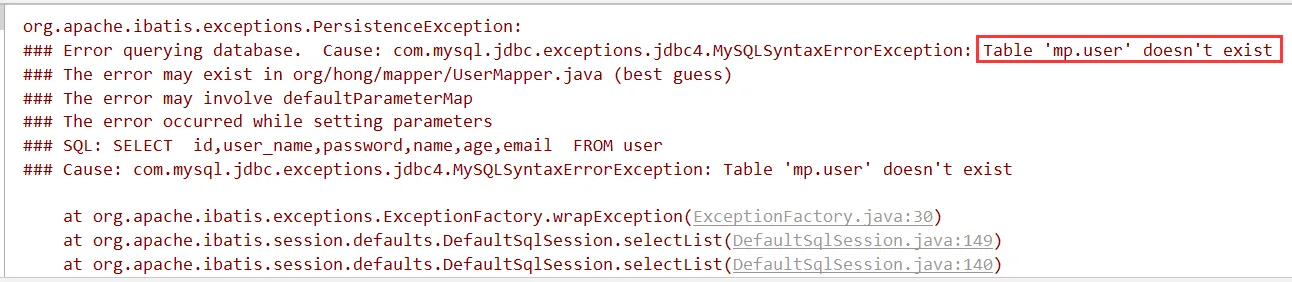
解决:在User类中添加@TableName,指定数据库表名
 1
 2
 3
 4
 5
 6
 7
 8
 9
10
11
12
13
14
15
16
17
18
19
| package org.hong.pojo;
import com.baomidou.mybatisplus.annotation.TableName;
import lombok.AllArgsConstructor;
import lombok.Data;
import lombok.NoArgsConstructor;
@Data
@NoArgsConstructor
@AllArgsConstructor
@TableName("tb_user")
public class User {
private Long id;
private String userName;
private String password;
private String name;
private Integer age;
private String email;
}
|
再次运行:
1
2
3
4
5
6
7
8
9
| [main] [cn.itcast.mp.simple.mapper.UserMapper.selectList]-[DEBUG] ==> Preparing:
SELECT id,user_name,password,name,age,email FROM tb_user
[main] [cn.itcast.mp.simple.mapper.UserMapper.selectList]-[DEBUG] ==> Parameters:
[main] [cn.itcast.mp.simple.mapper.UserMapper.selectList]-[DEBUG] <== Total: 5
User(id=1, userName=zhangsan, password=123456, name=张三, age=18, email=test1@itcast.cn)
User(id=2, userName=lisi, password=123456, name=李四, age=20, email=test2@itcast.cn)
User(id=3, userName=wangwu, password=123456, name=王五, age=28, email=test3@itcast.cn)
User(id=4, userName=zhaoliu, password=123456, name=赵六, age=21, email=test4@itcast.cn)
User(id=5, userName=sunqi, password=123456, name=孙七, age=24, email=test5@itcast.cn)
|
简单说明:
由于使用了MybatisSqlSessionFactoryBuilder进行了构建,继承的BaseMapper中的方法就载入到了 SqlSession中,所以就可以直接使用相关的方法;
Spring + Mybatis + MP#
引入了Spring框架,数据源、构建等工作就交给了Spring管理。
创建子Module#
 1
 2
 3
 4
 5
 6
 7
 8
 9
10
11
12
13
14
15
16
17
18
19
20
| <properties>
<spring.version>5.1.6.RELEASE</spring.version>
</properties>
<dependencies>
<dependency>
<groupId>org.springframework</groupId>
<artifactId>spring-webmvc</artifactId>
<version>${spring.version}</version>
</dependency>
<dependency>
<groupId>org.springframework</groupId>
<artifactId>spring-jdbc</artifactId>
<version>${spring.version}</version>
</dependency>
<dependency>
<groupId>org.springframework</groupId>
<artifactId>spring-test</artifactId>
<version>${spring.version}</version>
</dependency>
</dependencies>
|
实现查询Use#
第一步,编写jdbc.properties
1
2
3
4
5
| jdbc.driver=com.mysql.jdbc.Driver
jdbc.url=jdbc:mysql://127.0.0.1:3306/mp?
useUnicode=true&characterEncoding=utf8&autoReconnect=true&allowMultiQueries=true&useSSL=false
jdbc.username=root
jdbc.password=1234
|
第二步,编写applicationContext.xml
 1
 2
 3
 4
 5
 6
 7
 8
 9
10
11
12
13
14
15
16
17
18
19
20
21
22
23
24
25
26
27
28
29
| <?xml version="1.0" encoding="UTF-8"?>
<beans xmlns="http://www.springframework.org/schema/beans"
xmlns:xsi="http://www.w3.org/2001/XMLSchema-instance"
xmlns:context="http://www.springframework.org/schema/context"
xsi:schemaLocation="http://www.springframework.org/schema/beans
http://www.springframework.org/schema/beans/spring-beans.xsd
http://www.springframework.org/schema/context
http://www.springframework.org/schema/context/spring-context.xsd">
<context:property-placeholder location="classpath:*.properties"/>
<!-- 定义数据源 -->
<bean id="dataSource" class="com.alibaba.druid.pool.DruidDataSource"
destroy-method="close">
<property name="url" value="${jdbc.url}"/>
<property name="username" value="${jdbc.username}"/>
<property name="password" value="${jdbc.password}"/>
<property name="driverClassName" value="${jdbc.driver}"/>
<property name="maxActive" value="10"/>
<property name="minIdle" value="5"/>
</bean>
<!--这里使用MP提供的sqlSessionFactory,完成了Spring与MP的整合-->
<bean id="sqlSessionFactory"
class="com.baomidou.mybatisplus.extension.spring.MybatisSqlSessionFactoryBean">
<property name="dataSource" ref="dataSource"/>
</bean>
<!--扫描mapper接口,使用的依然是Mybatis原生的扫描器-->
<bean class="org.mybatis.spring.mapper.MapperScannerConfigurer">
<property name="basePackage" value="org.hong.mapper"/>
</bean>
</beans>
|
第三步,编写User对象以及UserMapper接口:
 1
 2
 3
 4
 5
 6
 7
 8
 9
10
11
12
13
14
15
16
17
18
19
| package org.hong.pojo;
import com.baomidou.mybatisplus.annotation.TableName;
import lombok.AllArgsConstructor;
import lombok.Data;
import lombok.NoArgsConstructor;
@Data
@NoArgsConstructor
@AllArgsConstructor
@TableName("tb_user")
public class User {
private Long id;
private String userName;
private String password;
private String name;
private Integer age;
private String email;
}
|
1
2
3
4
5
6
7
8
| package org.hong.mapper;
import com.baomidou.mybatisplus.core.mapper.BaseMapper;
import org.hong.pojo.User;
public interface UserMapper extends BaseMapper<User> {
}
|
第四步,编写测试用例:
 1
 2
 3
 4
 5
 6
 7
 8
 9
10
11
12
13
14
15
16
17
18
19
20
21
22
23
24
25
26
| package org.hong;
import org.hong.mapper.UserMapper;
import org.hong.pojo.User;
import org.junit.Test;
import org.junit.runner.RunWith;
import org.springframework.beans.factory.annotation.Autowired;
import org.springframework.test.context.ContextConfiguration;
import org.springframework.test.context.junit4.SpringJUnit4ClassRunner;
import java.util.List;
@RunWith(SpringJUnit4ClassRunner.class)
@ContextConfiguration(locations = {"classpath:applicationContext.xml"})
public class TestMyBatisSpring {
@Autowired
private UserMapper userMapper;
@Test
public void testSelectList(){
List<User> users = this.userMapper.selectList(null);
for (User user : users) {
System.out.println(user);
}
}
}
|
SpringBoot + Mybatis + MP#
使用SpringBoot将进一步的简化MP的整合,需要注意的是,由于使用SpringBoot需要继承parent,所以需要重新创建工程,并不是创建子Module。
创建工程#
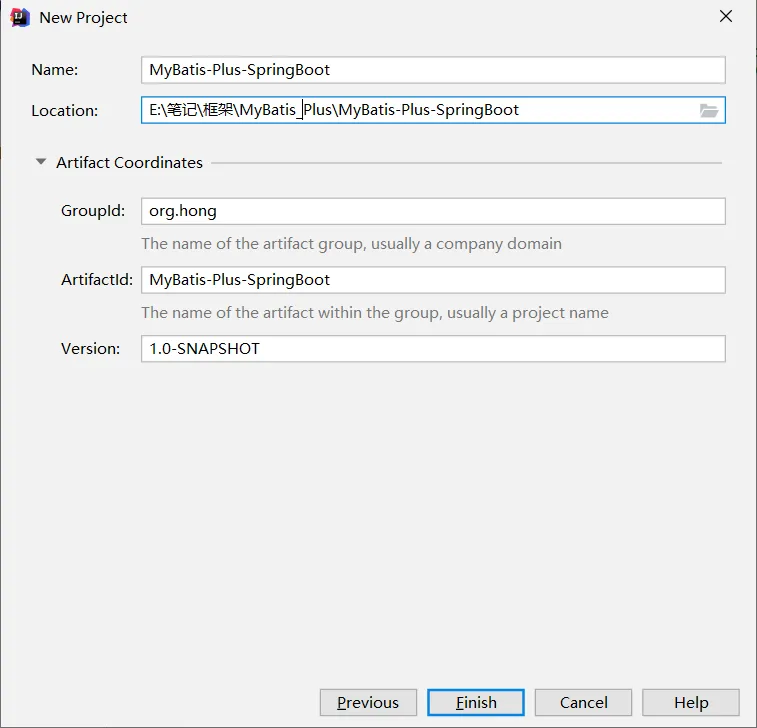
导入依赖#
pom.xml
 1
 2
 3
 4
 5
 6
 7
 8
 9
10
11
12
13
14
15
16
17
18
19
20
21
22
23
24
25
26
27
28
29
30
31
32
33
34
35
36
37
38
39
40
41
42
43
44
45
46
47
48
49
50
51
52
53
54
55
56
57
58
59
60
61
62
63
64
65
66
| <?xml version="1.0" encoding="UTF-8"?>
<project xmlns="http://maven.apache.org/POM/4.0.0"
xmlns:xsi="http://www.w3.org/2001/XMLSchema-instance"
xsi:schemaLocation="http://maven.apache.org/POM/4.0.0 http://maven.apache.org/xsd/maven-4.0.0.xsd">
<modelVersion>4.0.0</modelVersion>
<parent>
<groupId>org.springframework.boot</groupId>
<artifactId>spring-boot-starter-parent</artifactId>
<version>2.1.4.RELEASE</version>
</parent>
<groupId>org.hong</groupId>
<artifactId>MyBatis-Plus-SpringBoot</artifactId>
<version>1.0-SNAPSHOT</version>
<dependencies>
<dependency>
<groupId>org.springframework.boot</groupId>
<artifactId>spring-boot-starter</artifactId>
<exclusions>
<exclusion>
<groupId>org.springframework.boot</groupId>
<artifactId>spring-boot-starter-logging</artifactId>
</exclusion>
</exclusions>
</dependency>
<dependency>
<groupId>org.springframework.boot</groupId>
<artifactId>spring-boot-starter-test</artifactId>
<scope>test</scope>
</dependency>
<!--简化代码的工具包-->
<dependency>
<groupId>org.projectlombok</groupId>
<artifactId>lombok</artifactId>
<optional>true</optional>
</dependency>
<!--mybatis-plus的springboot支持-->
<dependency>
<groupId>com.baomidou</groupId>
<artifactId>mybatis-plus-boot-starter</artifactId>
<version>3.4.3</version>
</dependency>
<!--mysql驱动-->
<dependency>
<groupId>mysql</groupId>
<artifactId>mysql-connector-java</artifactId>
<version>5.1.47</version>
</dependency>
<dependency>
<groupId>org.slf4j</groupId>
<artifactId>slf4j-log4j12</artifactId>
</dependency>
</dependencies>
<build>
<plugins>
<plugin>
<groupId>org.springframework.boot</groupId>
<artifactId>spring-boot-maven-plugin</artifactId>
</plugin>
</plugins>
</build>
</project>
|
log4j.properties#
1
2
3
4
| log4j.rootLogger=DEBUG,A1
log4j.appender.A1=org.apache.log4j.ConsoleAppender
log4j.appender.A1.layout=org.apache.log4j.PatternLayout
log4j.appender.A1.layout.ConversionPattern=[%t] [%c]-[%p] %m%n
|
编写application.yaml#
1
2
3
4
5
6
| spring:
datasource:
driver-class-name: com.mysql.jdbc.Driver
url: jdbc:mysql://127.0.0.1:3306/mp?useUnicode=true&characterEncoding=utf8&autoReconnect=true&allowMultiQueries=true&useSSL=false
username: root
password: 1234
|
编写pojo#
 1
 2
 3
 4
 5
 6
 7
 8
 9
10
11
12
13
14
15
16
17
18
19
| package org.hong.pojo;
import com.baomidou.mybatisplus.annotation.TableName;
import lombok.AllArgsConstructor;
import lombok.Data;
import lombok.NoArgsConstructor;
@Data
@AllArgsConstructor
@NoArgsConstructor
@TableName("tb_user")
public class User {
private Long id;
private String userName;
private String password;
private String name;
private Integer age;
private String email;
}
|
编写 Mapper 接口#
1
2
3
4
5
6
| package org.hong.mapper;
import com.baomidou.mybatisplus.core.mapper.BaseMapper;
import org.hong.pojo.User;
public interface UserMapper extends BaseMapper<User> {}
|
编写启动类#
 1
 2
 3
 4
 5
 6
 7
 8
 9
10
11
12
13
| package org.hong;
import org.mybatis.spring.annotation.MapperScan;
import org.springframework.boot.SpringApplication;
import org.springframework.boot.autoconfigure.SpringBootApplication;
@MapperScan({"org.hong"})// 设置mapper接口的扫描包
@SpringBootApplication
public class MybatisPlusSpringbootApplication {
public static void main(String[] args) {
SpringApplication.run(MybatisPlusSpringbootApplication.class, args);
}
}
|
编写测试类#
 1
 2
 3
 4
 5
 6
 7
 8
 9
10
11
12
13
14
15
16
17
18
19
20
21
22
23
24
| package org.hong;
import org.hong.mapper.UserMapper;
import org.hong.pojo.User;
import org.junit.jupiter.api.Test;
import org.springframework.beans.factory.annotation.Autowired;
import org.springframework.boot.test.context.SpringBootTest;
import java.util.List;
@RunWith(SpringJUnit4ClassRunner.class)
@SpringBootTest
class MybatisPlusSpringbootApplicationTests {
@Autowired
private UserMapper userMapper;
@Test
void contextLoads() {
List<User> users = userMapper.selectList(null);
for (User user : users) {
System.out.println(user);
}
}
}
|
运行结果#
1
2
3
4
5
6
7
8
9
| [main] [org.hong.mapper.UserMapper.selectList]-[DEBUG] ==> Preparing: SELECT id,user_name,password,name,age,email FROM tb_user
[main] [org.hong.mapper.UserMapper.selectList]-[DEBUG] ==> Parameters:
[main] [org.hong.mapper.UserMapper.selectList]-[DEBUG] <== Total: 5
[main] [org.mybatis.spring.SqlSessionUtils]-[DEBUG] Closing non transactional SqlSession [org.apache.ibatis.session.defaults.DefaultSqlSession@3ee69ad8]
User(id=1, userName=zhangsan, password=123456, name=张三, age=18, email=test1@itcast.cn)
User(id=2, userName=lisi, password=123456, name=李四, age=20, email=test2@itcast.cn)
User(id=3, userName=wangwu, password=123456, name=王五, age=28, email=test3@itcast.cn)
User(id=4, userName=zhaoliu, password=123456, name=赵六, age=21, email=test4@itcast.cn)
User(id=5, userName=sunqi, password=123456, name=孙七, age=24, email=test5@itcast.cn)
|
通用 CRUD#
通过前面的学习,我们了解到通过继承BaseMapper就可以获取到各种各样的单表操作,接下来我们将详细讲解这些 操作。
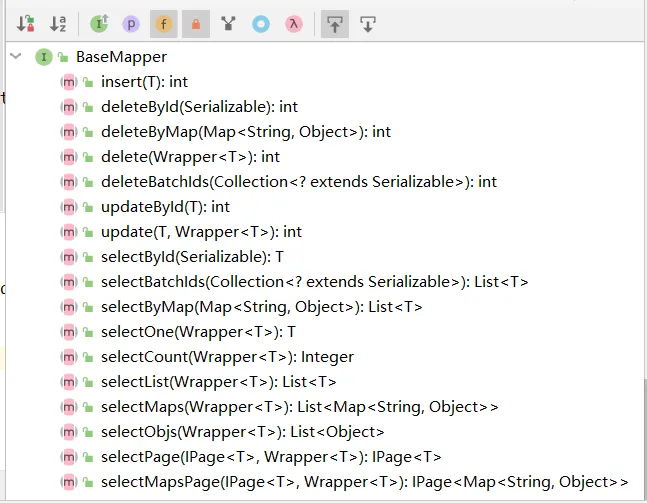
插入操作#
方法定义#
1
2
3
4
5
6
| /**
* 插入一条记录
*
* @param entity 实体对象
*/
int insert(T entity);
|
测试用例#
 1
 2
 3
 4
 5
 6
 7
 8
 9
10
11
12
13
14
15
16
17
18
19
20
21
22
23
24
25
26
27
28
29
30
31
32
33
| package org.hong;
import org.hong.mapper.UserMapper;
import org.hong.pojo.User;
import org.junit.Test;
import org.junit.runner.RunWith;
import org.springframework.beans.factory.annotation.Autowired;
import org.springframework.boot.test.context.SpringBootTest;
import org.springframework.test.context.junit4.SpringRunner;
@SpringBootTest
@RunWith(SpringRunner.class)
public class TestUserMapper {
@Autowired
private UserMapper userMapper;
@Test
public void testInsert(){
User user = new User();
user.setEmail("baomidou@qq.com");
user.setAge(8);
user.setUserName("mybatis-plus");
user.setName("baomidou");
user.setPassword("123456");
// 返回数据库受影响的行数
int result = this.userMapper.insert(user);
System.out.println("result => " + result);
// 获取自增后的id值, 自增后的id值会回填到user对象中
System.out.println("id => " + user.getId());
}
}
|
控制台输出#
1
2
3
4
5
6
| [main] [org.hong.mapper.UserMapper.insert]-[DEBUG] ==> Preparing: INSERT INTO tb_user ( id, user_name, password, name, age, email ) VALUES ( ?, ?, ?, ?, ?, ? )
[main] [org.hong.mapper.UserMapper.insert]-[DEBUG] ==> Parameters: 1370007317083680769(Long), mybatis-plus(String), 123456(String), baomidou(String), 8(Integer), baomidou@qq.com(String)
[main] [org.hong.mapper.UserMapper.insert]-[DEBUG] <== Updates: 1
[main] [org.mybatis.spring.SqlSessionUtils]-[DEBUG] Closing non transactional SqlSession [org.apache.ibatis.session.defaults.DefaultSqlSession@43a51d00]
result => 1
id => 1370007317083680769
|

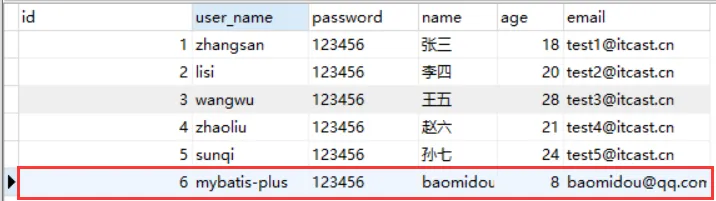
可以看到,数据已经写入到了数据库,但是,id的值不正确,我们期望的是数据库自增长,实际是MP生成了id的值写入到了数据库
@TableId#
如何设置id的生成策略呢? MP支持的id策略:
 1
 2
 3
 4
 5
 6
 7
 8
 9
10
11
12
13
14
15
16
17
18
19
20
21
22
23
24
25
26
27
28
29
30
31
32
33
34
35
36
37
38
39
40
41
42
43
44
45
46
| package com.baomidou.mybatisplus.annotation;
import lombok.Getter;
/**
* 生成ID类型枚举类
*
* @author hubin
* @since 2015-11-10
*/
@Getter
public enum IdType {
/**
* 数据库ID自增
*/
AUTO(0),
/**
* 该类型为未设置主键类型
*/
NONE(1),
/**
* 用户输入ID
* <p>该类型可以通过自己注册自动填充插件进行填充</p>
*/
INPUT(2),
/* 以下3种类型、只有当插入对象ID 为空,才自动填充。 */
/**
* 全局唯一ID (idWorker)
*/
ID_WORKER(3),
/**
* 全局唯一ID (UUID)
*/
UUID(4),
/**
* 字符串全局唯一ID (idWorker 的字符串表示)
*/
ID_WORKER_STR(5);
private final int key;
IdType(int key) {
this.key = key;
}
}
|
修改User类#
 1
 2
 3
 4
 5
 6
 7
 8
 9
10
11
12
13
14
15
16
17
18
19
20
21
22
| package org.hong.pojo;
import com.baomidou.mybatisplus.annotation.IdType;
import com.baomidou.mybatisplus.annotation.TableId;
import com.baomidou.mybatisplus.annotation.TableName;
import lombok.AllArgsConstructor;
import lombok.Data;
import lombok.NoArgsConstructor;
@Data
@AllArgsConstructor
@NoArgsConstructor
@TableName("tb_user")
public class User {
@TableId(type = IdType.AUTO)
private Long id;
private String userName;
private String password;
private String name;
private Integer age;
private String email;
}
|
再次运行,数据插入成功。
@TableField#
在MP中通过@TableField注解可以指定字段的一些属性,常常解决的问题有2个:
1、对象中的属性名和字段名不一致的问题(非驼峰)
2、对象中的属性字段在表中不存在的问题
 1
 2
 3
 4
 5
 6
 7
 8
 9
10
11
12
13
14
15
16
17
18
19
20
21
22
23
24
25
26
27
28
29
30
31
| package org.hong.pojo;
import com.baomidou.mybatisplus.annotation.IdType;
import com.baomidou.mybatisplus.annotation.TableField;
import com.baomidou.mybatisplus.annotation.TableId;
import com.baomidou.mybatisplus.annotation.TableName;
import lombok.AllArgsConstructor;
import lombok.Data;
import lombok.NoArgsConstructor;
@Data
@AllArgsConstructor
@NoArgsConstructor
@TableName("tb_user")
public class User {
@TableId(type = IdType.AUTO)
private Long id;
private String userName;
@TableField(select = false) // select: 设置是否在查询带上该字段; 如果为false, 则在查询时就不会带上该字段, 更不会封装这个字段
private String password;
private String name;
private Integer age;
@TableField(value = "email") // value: 指定数据库表中的字段名; 查询时会使用 (email as mail) 的方式
private String mail;
@TableField(exist = false) // exist: 设置属性是否在数据库中存在
private String address; // 这个属性在数据库表中是不存在的
}
|
更新操作#
在MP中,更新操作有2种,一种是根据id更新,另一种是根据条件更新。
根据id更新#
方法定义#
1
2
3
4
5
6
| /**
* 根据 ID 修改
*
* @param entity 实体对象
*/
int updateById(@Param(Constants.ENTITY) T entity);
|
 1
 2
 3
 4
 5
 6
 7
 8
 9
10
11
12
13
14
15
16
17
18
19
20
21
22
23
24
25
| package org.hong;
import org.hong.mapper.UserMapper;
import org.hong.pojo.User;
import org.junit.Test;
import org.junit.runner.RunWith;
import org.springframework.beans.factory.annotation.Autowired;
import org.springframework.boot.test.context.SpringBootTest;
import org.springframework.test.context.junit4.SpringRunner;
@SpringBootTest
@RunWith(SpringRunner.class)
public class TestUserMapper {
@Autowired
private UserMapper userMapper;
@Test
public void testUpdate(){
User user = new User();
user.setId(1L);
user.setAge(18);
int result = userMapper.updateById(user);
System.out.println("result => " + result);
}
}
|
控制台输出#
1
2
3
4
5
| [main] [org.hong.mapper.UserMapper.updateById]-[DEBUG] ==> Preparing: UPDATE tb_user SET age=? WHERE id=?
[main] [org.hong.mapper.UserMapper.updateById]-[DEBUG] ==> Parameters: 18(Integer), 1(Long)
[main] [org.hong.mapper.UserMapper.updateById]-[DEBUG] <== Updates: 1
[main] [org.mybatis.spring.SqlSessionUtils]-[DEBUG] Closing non transactional SqlSession [org.apache.ibatis.session.defaults.DefaultSqlSession@363a3d15]
result => 1
|
根据条件更新#
方法定义#
1
2
3
4
5
6
7
| /**
* 根据 whereEntity 条件,更新记录
*
* @param entity 实体对象 (set 条件值, 默认为null的字段不会加入到set中)
* @param updateWrapper 实体对象封装操作类(可以为 null, 用于生成 where 语句)
*/
int update(@Param(Constants.ENTITY) T entity, @Param(Constants.WRAPPER) Wrapper<T> updateWrapper);
|
测试用例#
 1
 2
 3
 4
 5
 6
 7
 8
 9
10
11
12
13
14
15
16
17
18
| @SpringBootTest
@RunWith(SpringRunner.class)
public class TestUserMapper {
@Test
public void testUpdate(){
User user = new User();
user.setAge(25);// 更新的字段
user.setPassword("666888");
QueryWrapper<User> wrapper = new QueryWrapper<>();
// 更新条件: 匹配 user_name = zhangsan 的用户
wrapper.eq("user_name", "zhangsan");
// 根据条件跟新
int result = userMapper.update(user, wrapper);
System.out.println("result => " + result);
}
}
|
测试结果
1
2
3
4
5
| [main] [org.hong.mapper.UserMapper.update]-[DEBUG] ==> Preparing: UPDATE tb_user SET password=?, age=? WHERE user_name = ?
[main] [org.hong.mapper.UserMapper.update]-[DEBUG] ==> Parameters: 666888(String), 25(Integer), zhangsan(String)
[main] [org.hong.mapper.UserMapper.update]-[DEBUG] <== Updates: 1
[main] [org.mybatis.spring.SqlSessionUtils]-[DEBUG] Closing non transactional SqlSession [org.apache.ibatis.session.defaults.DefaultSqlSession@4fad6218]
result => 1
|
或者,通过UpdateWrapper进行更新
 1
 2
 3
 4
 5
 6
 7
 8
 9
10
| @Test
public void testUpdate2(){
UpdateWrapper<User> wrapper = new UpdateWrapper<>();
wrapper.set("age", 21).set("password", "999999") // 更新的字段
.eq("user_name", "zhangsan"); // 更新条件
// 根据条件跟新
int result = userMapper.update(null, wrapper);
System.out.println("result => " + result);
}
|
测试结果
1
2
3
4
5
| [main] [org.hong.mapper.UserMapper.update]-[DEBUG] ==> Preparing: UPDATE tb_user SET age=?,password=? WHERE user_name = ?
[main] [org.hong.mapper.UserMapper.update]-[DEBUG] ==> Parameters: 21(Integer), 999999(String), zhangsan(String)
[main] [org.hong.mapper.UserMapper.update]-[DEBUG] <== Updates: 1
[main] [org.mybatis.spring.SqlSessionUtils]-[DEBUG] Closing non transactional SqlSession [org.apache.ibatis.session.defaults.DefaultSqlSession@6ea04618]
result => 1
|
均可达到更新的效果。 关于wrapper更多的用法后面会详细讲解。
删除操作#
deleteById#
方法定义#
1
2
3
4
5
6
| /**
* 根据 ID 删除
*
* @param id 主键ID
*/
int deleteById(Serializable id);
|
测试用例#
1
2
3
4
5
6
| @Test
public void testDeleteById(){
// 根据id删除数据
int result = userMapper.deleteById(9);
System.out.println("result => " + result);
}
|
控制台打印#
1
2
3
4
5
| [main] [org.hong.mapper.UserMapper.deleteById]-[DEBUG] ==> Preparing: DELETE FROM tb_user WHERE id=?
[main] [org.hong.mapper.UserMapper.deleteById]-[DEBUG] ==> Parameters: 9(Integer)
[main] [org.hong.mapper.UserMapper.deleteById]-[DEBUG] <== Updates: 1
[main] [org.mybatis.spring.SqlSessionUtils]-[DEBUG] Closing non transactional SqlSession [org.apache.ibatis.session.defaults.DefaultSqlSession@1640c151]
result => 1
|
deleteByMap#
方法定义#
1
2
3
4
5
6
| /**
* 根据 columnMap 条件,删除记录,条件之间是and的关系
*
* @param columnMap 表字段 map 对象
*/
int deleteByMap(@Param(Constants.COLUMN_MAP) Map<String, Object> columnMap);
|
测试用例#
 1
 2
 3
 4
 5
 6
 7
 8
 9
10
| @Test
public void testDeleteMap(){
HashMap<String, Object> map = new HashMap<>();
map.put("user_name", "zhangsan");
map.put("password", "123456");
// 根据map删除数据, 多条件之间是and的关系
int result = userMapper.deleteByMap(map);
System.out.println("result => " + result);
}
|
控制台打印#
1
2
3
4
5
| [main] [org.hong.mapper.UserMapper.deleteByMap]-[DEBUG] ==> Preparing: DELETE FROM tb_user WHERE password = ? AND user_name = ?
[main] [org.hong.mapper.UserMapper.deleteByMap]-[DEBUG] ==> Parameters: 123456(String), zhangsan(String)
[main] [org.hong.mapper.UserMapper.deleteByMap]-[DEBUG] <== Updates: 0
[main] [org.mybatis.spring.SqlSessionUtils]-[DEBUG] Closing non transactional SqlSession [org.apache.ibatis.session.defaults.DefaultSqlSession@5c20aab9]
result => 0
|
delete#
方法定义#
1
2
3
4
5
6
| /**
* 根据 entity 条件,删除记录
*
* @param wrapper 实体对象封装操作类(可以为 null)
*/
int delete(@Param(Constants.WRAPPER) Wrapper<T> wrapper);
|
测试用例#
 1
 2
 3
 4
 5
 6
 7
 8
 9
10
11
12
13
14
15
16
17
18
| @Test
public void testDelete(){
// 用法一:
// QueryWrapper<User> wrapper = new QueryWrapper<>();
// wrapper.eq("user_name", "mybatis-plus")
// .eq("password", "123456");
// 用法二:
User user = new User();
user.setUserName("mybatis-plus");
user.setPassword("123456");
// 将实体对象进行包装, 包装为操作条件
QueryWrapper<User> wrapper = new QueryWrapper<User>(user);
// 根据包装条件做删除
int result = userMapper.delete(wrapper);
System.out.println("result => " + result);
}
|
控制台打印#
1
2
3
4
5
| [main] [org.hong.mapper.UserMapper.delete]-[DEBUG] ==> Preparing: DELETE FROM tb_user WHERE user_name = ? AND password = ?
[main] [org.hong.mapper.UserMapper.delete]-[DEBUG] ==> Parameters: mybatis-plus(String), 123456(String)
[main] [org.hong.mapper.UserMapper.delete]-[DEBUG] <== Updates: 2
[main] [org.mybatis.spring.SqlSessionUtils]-[DEBUG] Closing non transactional SqlSession [org.apache.ibatis.session.defaults.DefaultSqlSession@6dd82486]
result => 2
|
deleteBatchIds#
方法定义#
1
2
3
4
5
6
| /**
* 删除(根据ID 批量删除)
*
* @param idList 主键ID列表(不能为 null 以及 empty)
*/
int deleteBatchIds(@Param(Constants.COLLECTION) Collection<? extends Serializable> idList);
|
测试用例#
1
2
3
4
5
6
| @Test
public void testDelteBatchIds(){
// 根据id批量删除数据
int result = userMapper.deleteBatchIds(Arrays.asList(10, 11, 12));
System.out.println("result => " + result);
}
|
控制台打印#
1
2
3
4
5
| [main] [org.hong.mapper.UserMapper.deleteBatchIds]-[DEBUG] ==> Preparing: DELETE FROM tb_user WHERE id IN ( ? , ? , ? )
[main] [org.hong.mapper.UserMapper.deleteBatchIds]-[DEBUG] ==> Parameters: 10(Integer), 11(Integer), 12(Integer)
[main] [org.hong.mapper.UserMapper.deleteBatchIds]-[DEBUG] <== Updates: 3
[main] [org.mybatis.spring.SqlSessionUtils]-[DEBUG] Closing non transactional SqlSession [org.apache.ibatis.session.defaults.DefaultSqlSession@74aa9c72]
result => 3
|
查询操作#
MP提供了多种查询操作,包括根据id查询、批量查询、查询单条数据、查询列表、分页查询等操作。
selectById#
方法定义#
1
2
3
4
5
6
| /**
* 根据 ID 查询
*
* @param id 主键ID
*/
T selectById(Serializable id);
|
测试用例#
1
2
3
4
5
| @Test
public void testSelectById(){
User user = userMapper.selectById(1L);
System.out.println(user);
}
|
控制台打印#
1
2
3
4
5
| [main] [org.hong.mapper.UserMapper.selectById]-[DEBUG] ==> Preparing: SELECT id,user_name,name,age,email FROM tb_user WHERE id=?
[main] [org.hong.mapper.UserMapper.selectById]-[DEBUG] ==> Parameters: 1(Long)
[main] [org.hong.mapper.UserMapper.selectById]-[DEBUG] <== Total: 1
[main] [org.mybatis.spring.SqlSessionUtils]-[DEBUG] Closing non transactional SqlSession [org.apache.ibatis.session.defaults.DefaultSqlSession@e48bf9a]
User(id=1, userName=zhangsan, password=null, name=张三, age=21, email=test1@itcast.cn, address=null)
|
selectBatchId#
方法定义#
1
2
3
4
5
6
| /**
* 查询(根据ID 批量查询)
*
* @param idList 主键ID列表(不能为 null 以及 empty)
*/
List<T> selectBatchIds(@Param(Constants.COLLECTION) Collection<? extends Serializable> idList);
|
测试用例#
1
2
3
4
5
6
7
| @Test
public void testSelectBatchIds(){
List<User> users = userMapper.selectBatchIds(Arrays.asList(1L, 2L, 3L));
for (User user : users) {
System.out.println(user);
}
}
|
控制台打印#
1
2
3
4
5
6
7
| [main] [org.hong.mapper.UserMapper.selectBatchIds]-[DEBUG] ==> Preparing: SELECT id,user_name,name,age,email FROM tb_user WHERE id IN ( ? , ? , ? )
[main] [org.hong.mapper.UserMapper.selectBatchIds]-[DEBUG] ==> Parameters: 1(Long), 2(Long), 3(Long)
[main] [org.hong.mapper.UserMapper.selectBatchIds]-[DEBUG] <== Total: 3
[main] [org.mybatis.spring.SqlSessionUtils]-[DEBUG] Closing non transactional SqlSession [org.apache.ibatis.session.defaults.DefaultSqlSession@c1fca2a]
User(id=1, userName=zhangsan, password=null, name=张三, age=21, email=test1@itcast.cn, address=null)
User(id=2, userName=lisi, password=null, name=李四, age=20, email=test2@itcast.cn, address=null)
User(id=3, userName=wangwu, password=null, name=王五, age=28, email=test3@itcast.cn, address=null)
|
selectOne#
方法定义#
1
2
3
4
5
6
| /**
* 根据 entity 条件,查询一条记录
*
* @param queryWrapper 实体对象封装操作类(可以为 null)
*/
T selectOne(@Param(Constants.WRAPPER) Wrapper<T> queryWrapper);
|
测试用例#
1
2
3
4
5
6
7
8
| @Test
public void testSelectOne(){
QueryWrapper<User> wrapper = new QueryWrapper<>();
wrapper.eq("id", "3");
// 查询的数据如果大于1则会保存, 因此查询结果要么为null要么为1
User user = userMapper.selectOne(wrapper);
System.out.println(user);
}
|
控制台打印#
1
2
3
4
5
| [main] [org.hong.mapper.UserMapper.selectOne]-[DEBUG] ==> Preparing: SELECT id,user_name,name,age,email FROM tb_user WHERE id = ?
[main] [org.hong.mapper.UserMapper.selectOne]-[DEBUG] ==> Parameters: 3(String)
[main] [org.hong.mapper.UserMapper.selectOne]-[DEBUG] <== Total: 1
[main] [org.mybatis.spring.SqlSessionUtils]-[DEBUG] Closing non transactional SqlSession [org.apache.ibatis.session.defaults.DefaultSqlSession@1aac188d]
User(id=3, userName=wangwu, password=null, name=王五, age=28, email=test3@itcast.cn, address=null)
|
selectCount#
方法定义#
1
2
3
4
5
6
| /**
* 根据 Wrapper 条件,查询总记录数
*
* @param queryWrapper 实体对象封装操作类(可以为 null)
*/
Integer selectCount(@Param(Constants.WRAPPER) Wrapper<T> queryWrapper);
|
测试用例#
1
2
3
4
5
6
| @Test
public void testSelectCount(){
// 如果wrapper为null, 则没有查询条件, 就是查询所有
Integer count = userMapper.selectCount(null);
System.out.println("count => " + count);
}
|
控制台打印#
1
2
3
4
5
| [main] [org.hong.mapper.UserMapper.selectCount]-[DEBUG] ==> Preparing: SELECT COUNT( 1 ) FROM tb_user
[main] [org.hong.mapper.UserMapper.selectCount]-[DEBUG] ==> Parameters:
[main] [org.hong.mapper.UserMapper.selectCount]-[DEBUG] <== Total: 1
[main] [org.mybatis.spring.SqlSessionUtils]-[DEBUG] Closing non transactional SqlSession [org.apache.ibatis.session.defaults.DefaultSqlSession@164a62bf]
count => 5
|
selectList#
方法定义#
1
2
3
4
5
6
| /**
* 根据 entity 条件,查询全部记录
*
* @param queryWrapper 实体对象封装操作类(可以为 null)
*/
List<T> selectList(@Param(Constants.WRAPPER) Wrapper<T> queryWrapper);
|
测试用例#
 1
 2
 3
 4
 5
 6
 7
 8
 9
10
| @Test
public void testSelectList(){
QueryWrapper<User> wrapper = new QueryWrapper<User>();
// 设置查询条件
wrapper.like("email", "itcast");
List<User> users = userMapper.selectList(wrapper);
for (User user : users) {
System.out.println(user);
}
}
|
控制台打印#
1
2
3
4
5
6
7
8
9
| [main] [org.hong.mapper.UserMapper.selectList]-[DEBUG] ==> Preparing: SELECT id,user_name,name,age,email FROM tb_user WHERE email LIKE ?
[main] [org.hong.mapper.UserMapper.selectList]-[DEBUG] ==> Parameters: %itcast%(String)
[main] [org.hong.mapper.UserMapper.selectList]-[DEBUG] <== Total: 5
[main] [org.mybatis.spring.SqlSessionUtils]-[DEBUG] Closing non transactional SqlSession [org.apache.ibatis.session.defaults.DefaultSqlSession@4fad6218]
User(id=1, userName=zhangsan, password=null, name=张三, age=21, email=test1@itcast.cn, address=null)
User(id=2, userName=lisi, password=null, name=李四, age=20, email=test2@itcast.cn, address=null)
User(id=3, userName=wangwu, password=null, name=王五, age=28, email=test3@itcast.cn, address=null)
User(id=4, userName=zhaoliu, password=null, name=赵六, age=21, email=test4@itcast.cn, address=null)
User(id=5, userName=sunqi, password=null, name=孙七, age=24, email=test5@itcast.cn, address=null)
|
selectPage#
方法定义#
1
2
3
4
5
6
7
| /**
* 根据 entity 条件,查询全部记录(并翻页)
*
* @param page 分页查询条件(可以为 RowBounds.DEFAULT)
* @param queryWrapper 实体对象封装操作类(可以为 null)
*/
IPage<T> selectPage(IPage<T> page, @Param(Constants.WRAPPER) Wrapper<T> queryWrapper);
|
配置分页插件#
 1
 2
 3
 4
 5
 6
 7
 8
 9
10
11
12
13
14
15
16
17
| package org.hong.config;
import com.baomidou.mybatisplus.extension.plugins.PaginationInterceptor;
import org.mybatis.spring.annotation.MapperScan;
import org.springframework.context.annotation.Bean;
import org.springframework.context.annotation.Configuration;
@MapperScan({"org.hong.mapper"})
@Configuration
public class MyBatisPlusConfig {
// 配置分页插件
@Bean
public PaginationInterceptor paginationInterceptor(){
PaginationInterceptor paginationInterceptor = new PaginationInterceptor();
return paginationInterceptor;
}
}
|
测试用例#
 1
 2
 3
 4
 5
 6
 7
 8
 9
10
11
12
13
14
15
16
17
18
19
20
21
22
| @Test
public void testSelectPage(){
QueryWrapper<User> wrapper = new QueryWrapper<User>();
// 设置查询条件
wrapper.like("email", "itcast");
Page<User> page = new Page<User>();
// 设置当前页数
page.setCurrent(1);
// 设置每页的数量
page.setSize(1);
IPage<User> userIPage = userMapper.selectPage(page, wrapper);
System.out.println("数据总条数:" + userIPage.getTotal());
System.out.println("数据总页数:" + userIPage.getPages());
System.out.println("当前页数:" + userIPage.getCurrent());
// 获取查询数据
List<User> users = userIPage.getRecords();
for (User user : users) {
System.out.println(user);
}
}
|
控制台打印#
 1
 2
 3
 4
 5
 6
 7
 8
 9
10
11
12
13
| [main] [com.baomidou.mybatisplus.extension.plugins.pagination.optimize.JsqlParserCountOptimize]-[DEBUG] JsqlParserCountOptimize sql=SELECT id,user_name,name,age,email FROM tb_user
WHERE email LIKE ?
[main] [org.hong.mapper.UserMapper.selectPage]-[DEBUG] ==> Preparing: SELECT COUNT(1) FROM tb_user WHERE email LIKE ?
[main] [org.hong.mapper.UserMapper.selectPage]-[DEBUG] ==> Parameters: %itcast%(String)
[main] [org.hong.mapper.UserMapper.selectPage]-[DEBUG] ==> Preparing: SELECT id,user_name,name,age,email FROM tb_user WHERE email LIKE ? LIMIT ?,?
[main] [org.hong.mapper.UserMapper.selectPage]-[DEBUG] ==> Parameters: %itcast%(String), 0(Long), 1(Long)
[main] [org.hong.mapper.UserMapper.selectPage]-[DEBUG] <== Total: 1
[main] [org.mybatis.spring.SqlSessionUtils]-[DEBUG] Closing non transactional SqlSession [org.apache.ibatis.session.defaults.DefaultSqlSession@7c9bdee9]
数据总条数:5
数据总页数:5
当前页数:1
User(id=1, userName=zhangsan, password=null, name=张三, age=21, email=test1@itcast.cn, address=null)
|
在MP中有大量的配置,其中有一部分是Mybatis原生的配置,另一部分是MP的配置,详情:https://mybatis.plus/config/ 。
基本配置#
configLocation#
MyBatis 配置文件位置,如果您有单独的 MyBatis 配置,请将其路径配置到 configLocation 中。 MyBatis Configuration 的具体内容请参考MyBatis 官方文档
Spring Boot:
1
2
| mybatis-plus:
config-location: classpath:mybatis-config.xml
|
Spring MVC
1
2
3
| <bean id="sqlSessionFactory" class="com.baomidou.mybatisplus.extension.spring.MybatisSqlSessionFactoryBean">
<property name="configLocation" value="classpath:mybatis-config.xml"/>
</bean>
|
mapperLocations#
MyBatis Mapper 所对应的 XML 文件位置,如果您在 Mapper 中有自定义方法(XML 中有自定义实现),需要进行该配置,告诉 Mapper 所对应的 XML 文件位置。
Spring Boot:
1
2
| mybatis-plus:
mapper-locations: classpath*:mapper/**/*.xml # 默认就是这个值
|
Spring MVC:
1
2
3
| <bean id="sqlSessionFactory" class="com.baomidou.mybatisplus.extension.spring.MybatisSqlSessionFactoryBean">
<property name="mapperLocations" value="classpath*:mapper/**/*.xml"/>
</bean>
|
Maven 多模块项目的扫描路径需以 classpath*: 开头 (即加载多个 jar 包下的 XML 文件)
typeAliasesPackage#
MyBaits 别名包扫描路径,通过该属性可以给包中的类注册别名,注册后在 Mapper 对应的 XML 文件中可以直接使 用类名,而不用使用全限定的类名(即 XML 中调用的时候不用包含包名)。
Spring Boot:
1
2
| mybatis-plus:
type-aliases-package: org.hong.pojo
|
Spring MVC:
1
2
3
| <bean id="sqlSessionFactory" class="com.baomidou.mybatisplus.extension.spring.MybatisSqlSessionFactoryBean">
<property name="typeAliasesPackage" value="com.baomidou.mybatisplus.samples.quickstart.entity"/>
</bean>
|
进阶配置#
本部分(Configuration)的配置大都为 MyBatis 原生支持的配置,这意味着您可以通过 MyBatis XML 配置文件的形 式进行配置。
mapUnderscoreToCamelCase#
是否开启自动驼峰命名规则(camel case)映射,即从经典数据库列名 A_COLUMN(下划线命名) 到经典 Java 属 性名 aColumn(驼峰命名) 的类似映射。
注意: 此属性在 MyBatis 中原默认值为 false,在 MyBatis-Plus 中,此属性也将用于生成最终的 SQL 的 select body 如果您的数据库命名符合规则无需使用 @TableField 注解指定数据库字段名
示例(SpringBoot):
1
2
3
4
| #关闭自动驼峰映射,该参数不能和mybatis-plus.config-location同时存在
mybatis-plus:
configuration:
map-underscore-to-camel-case: false
|
cacheEnabled#
全局地开启或关闭配置文件中的所有映射器已经配置的任何缓存,默认为 true。
示例(SpringBoot):
1
2
3
| mybatis-plus:
configuration:
cache-enabled: false
|
DB 策略配置#
idType#
- 类型:
com.baomidou.mybatisplus.annotation.IdType - 默认值:
ID_WORKER
全局默认主键类型,设置后,即可省略实体对象中的 @TableId(type = IdType.AUTO) 配置。
SpringBoot:
1
2
3
4
| mybatis-plus:
global-config:
db-config:
id-type: auto
|
SpringMVC:
 1
 2
 3
 4
 5
 6
 7
 8
 9
10
11
| <!--这里使用MP提供的sqlSessionFactory,完成了Spring与MP的整合-->
<bean id="sqlSessionFactory" class="com.baomidou.mybatisplus.extension.spring.MybatisSqlSessionFactoryBean">
<property name="dataSource" ref="dataSource"/>
<property name="globalConfig" ref="globalConfig"/>
</bean>
<bean id="globalConfig" class="com.baomidou.mybatisplus.core.config.GlobalConfig">
<property name="dbConfig" ref="dbConfig"/>
</bean>
<bean id="dbConfig" class="com.baomidou.mybatisplus.core.config.GlobalConfig$DbConfig">
<property name="idType" value="AUTO"/>
</bean>
|
tablePrefix#
表名前缀,全局配置后可省略符合前缀规范的@TableName()配置。
SpringBoot:
1
2
3
4
| mybatis-plus:
global-config:
db-config:
table-prefix: tb_
|
SpringMVC:
 1
 2
 3
 4
 5
 6
 7
 8
 9
10
11
12
| <!--这里使用MP提供的sqlSessionFactory,完成了Spring与MP的整合-->
<bean id="sqlSessionFactory" class="com.baomidou.mybatisplus.extension.spring.MybatisSqlSessionFactoryBean">
<property name="dataSource" ref="dataSource"/>
<property name="globalConfig" ref="globalConfig"/>
</bean>
<bean id="globalConfig" class="com.baomidou.mybatisplus.core.config.GlobalConfig">
<property name="dbConfig" ref="dbConfig"/>
</bean>
<bean id="dbConfig" class="com.baomidou.mybatisplus.core.config.GlobalConfig$DbConfig">
<property name="idType" value="AUTO"/>
<property name="tablePrefix" value="tb_"/>
</bean>
|
条件构造器#
在MP中,Wrapper接口的实现类关系如下:
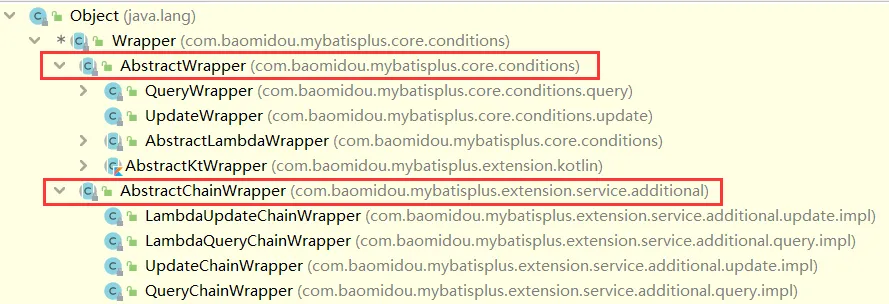
可以看到,AbstractWrapper和AbstractChainWrapper是重点实现,接下来我们重点学习AbstractWrapper以及其 子类。
说明: QueryWrapper(LambdaQueryWrapper) 和 UpdateWrapper(LambdaUpdateWrapper) 的父类 用于生成 sql 的 where 条件, entity 属性也用于生成 sql 的 where 条件 注意: entity 生成的 where 条件与 使用各个 api 生成 的 where 条件没有任何关联行为
官网文档地址:https://mybatis.plus/guide/wrapper.html
allEq#
1
2
3
| allEq(Map<R, V> params)
allEq(Map<R, V> params, boolean null2IsNull)
allEq(boolean condition, Map<R, V> params, boolean null2IsNull)
|
全部eq(或个别isNull)
个别参数说明: params : key 为数据库字段名, value 为字段值
null2IsNull : 为 false 时忽略为 null 的 entry,为 true 时 map 中的所有 entry 都会作为条件;默认为 true
condition : 为 true 时 map 生效,为 false 时 map 失效;默认为 true
例1: allEq({id:1,name:“老王”,age:null}) —> id = 1 and name = ‘老王’ and age is null
例2: allEq({id:1,name:“老王”,age:null}, false) —> id = 1 and name = ‘老王’
1
2
3
| allEq(BiPredicate<R, V> filter, Map<R, V> params)
allEq(BiPredicate<R, V> filter, Map<R, V> params, boolean null2IsNull)
allEq(boolean condition, BiPredicate<R, V> filter, Map<R, V> params, boolean null2IsNull)
|
个别参数说明: filter : 过滤函数,是否允许字段传入比对条件中
例1: allEq((k,v) -> k.indexOf(“a”) > 0, {id:1,name:“老王”,age:null}) —> name = ‘老王’ and age is null
例2: allEq((k,v) -> k.indexOf(“a”) > 0, {id:1,name:“老王”,age:null}, false) —> name = ‘老王’
测试用例#
 1
 2
 3
 4
 5
 6
 7
 8
 9
10
11
12
13
14
15
16
17
18
19
20
21
| @Test
public void testAllEp(){
QueryWrapper<User> wrapper = new QueryWrapper<>();
Map<String, Object> params = new HashMap<String, Object>();
params.put("name", "张三");
params.put("age", "21");
params.put("password", null);
// SELECT id,user_name,name,age,email FROM tb_user WHERE password IS NULL AND name = ? AND age = ?
//wrapper.allEq(params);
// SELECT id,user_name,name,age,email FROM tb_user WHERE name = ? AND age = ?
//wrapper.allEq(params, false);
// SELECT id,user_name,name,age,email FROM tb_user WHERE age = ?
wrapper.allEq((k, v) -> k.equals("age") || k.equals("id") || k.equals("name"), params);
List<User> users = userMapper.selectList(wrapper);
for (User user : users) {
System.out.println(user);
}
}
|
基本比较操作#
- eq 等于 =
- ne 不等于 <>
- gt 大于 >
- ge 大于等于 >=
- lt 小于 <
- le 小于等于 <=
- between BETWEEN 值1 AND 值2
- notBetween NOT BETWEEN 值1 AND 值2
- in 字段 IN (value.get(0), value.get(1), …)
- notIn 字段 NOT IN (v0, v1, …)
测试用例
 1
 2
 3
 4
 5
 6
 7
 8
 9
10
11
12
| @Test
public void testEq(){
QueryWrapper<User> wrapper = new QueryWrapper<>();
// SELECT id,user_name,password,name,age,email FROM tb_user WHERE password = ? AND age >= ? AND id IN (?,?,?,?,?)
wrapper.eq("password", "123456").
ge("age", 20).
in("id", 1, 2, 3, 4, 5);
List<User> users = userMapper.selectList(wrapper);
for (User user : users) {
System.out.println(user);
}
}
|
模糊查询#
- like LIKE
- ‘%值%’
- 例: like(“name”, “王”) —> name like ‘%王%’
- notLike
- NOT LIKE ‘%值%’
- 例: notLike(“name”, “王”) —> name not like ‘%王%’
- likeLeft
- LIKE ‘%值’
- 例: likeLeft(“name”, “王”) —> name like ‘%王’
- likeRight
- LIKE ‘值%’ 例:
- likeRight(“name”, “王”) —> name like ‘王%’
测试用例
 1
 2
 3
 4
 5
 6
 7
 8
 9
10
11
| @Test
public void testLike(){
QueryWrapper<User> wrapper = new QueryWrapper<>();
// SELECT id,user_name,password,name,age,email FROM tb_user WHERE user_name LIKE ?
// Parameters: %s%(String)
wrapper.like("user_name", "s");
List<User> users = userMapper.selectList(wrapper);
for (User user : users) {
System.out.println(user);
}
}
|
- orderBy 排序:
- ORDER BY 字段, …
- 例: orderBy(true, true, “id”, “name”) —> order by id ASC,name ASC
- orderByAsc 排序:
- ORDER BY 字段, … ASC
- 例: orderByAsc(“id”, “name”) —> order by id ASC,name ASC
- orderByDesc 排序:
- ORDER BY 字段, … DESC
- 例: orderByDesc(“id”, “name”) —> order by id DESC,name DESC
测试用例
 1
 2
 3
 4
 5
 6
 7
 8
 9
10
11
| @Test
public void testOrderBy(){
QueryWrapper<User> wrapper = new QueryWrapper<>();
// 按照年龄降序
// SELECT id,user_name,password,name,age,email FROM tb_user ORDER BY age DESC
wrapper.orderByDesc("age");
List<User> users = userMapper.selectList(wrapper);
for (User user : users) {
System.out.println(user);
}
}
|
逻辑查询#
- or
- 拼接 OR
- 主动调用 or 表示紧接着下一个方法不是用 and 连接!(不调用 or 则默认为使用 and 连接)
- and
- AND 嵌套
- 例: and(i -> i.eq(“name”, “李白”).ne(“status”, “活着”)) —> and (name = ‘李白’ and status <> ‘活着’)
测试用例
 1
 2
 3
 4
 5
 6
 7
 8
 9
10
11
12
13
| @Test
public void testOr(){
QueryWrapper<User> wrapper = new QueryWrapper<>();
// SELECT id,user_name,password,name,age,email FROM tb_user WHERE name = ? OR age = ?
//wrapper.eq("name", "张三").or().eq("age", 24);
//SELECT id,user_name,password,name,age,email FROM tb_user WHERE ( user_name = ? AND password = ? )
wrapper.and(fun -> fun.eq("user_name", "zhangsan").eq("password", "123456"));
List<User> users = userMapper.selectList(wrapper);
for (User user : users) {
System.out.println(user);
}
}
|
select#
在MP查询中,默认查询所有的字段,如果有需要也可以通过select方法进行指定字段。
测试用例
 1
 2
 3
 4
 5
 6
 7
 8
 9
10
11
12
13
| @Test
public void testSelect(){
QueryWrapper<User> wrapper = new QueryWrapper<>();
// SELECT user_name,password FROM tb_user WHERE name = ? OR age = ?
wrapper.eq("name", "张三")
.or()
.eq("age", 24)
.select("user_name", "password");// 指定查询的字段
List<User> users = userMapper.selectList(wrapper);
for (User user : users) {
System.out.println(user);
}
}
|
ActiveRecord#
ActiveRecord(简称AR)一直广受动态语言( PHP 、 Ruby 等)的喜爱,而 Java 作为准静态语言,对于 ActiveRecord 往往只能感叹其优雅,所以我们也在 AR 道路上进行了一定的探索,喜欢大家能够喜欢。
什么是ActiveRecord?
ActiveRecord也属于ORM(对象关系映射)层,由Rails最早提出,遵循标准的ORM模型:表映射到记录,记 录映射到对象,字段映射到对象属性。配合遵循的命名和配置惯例,能够很大程度的快速实现模型的操作,而 且简洁易懂。
ActiveRecord的主要思想是:
- 每一个数据库表对应创建一个类,类的每一个对象实例对应于数据库中表的一行记录;
- 通常表的每个字段 在类中都有相应的Field; ActiveRecord同时负责把自己持久化,在ActiveRecord中封装了对数据库的访问,即CURD;
- ActiveRecord是一种领域模型(Domain Model),封装了部分业务逻辑;
开启AR之旅#
在MP中,开启AR非常简单,只需要将实体对象继承Model即可。
 1
 2
 3
 4
 5
 6
 7
 8
 9
10
11
12
13
14
15
16
17
18
19
20
21
22
23
24
25
| package org.hong.pojo;
import com.baomidou.mybatisplus.annotation.IdType;
import com.baomidou.mybatisplus.annotation.TableField;
import com.baomidou.mybatisplus.annotation.TableId;
import com.baomidou.mybatisplus.annotation.TableName;
import com.baomidou.mybatisplus.extension.activerecord.Model;
import lombok.AllArgsConstructor;
import lombok.Data;
import lombok.NoArgsConstructor;
@Data
@AllArgsConstructor
@NoArgsConstructor
@TableName("tb_user")
public class User extends Model<User> {
@TableId(type = IdType.AUTO)
private Long id;
private String userName;
private String password;
private String name;
private Integer age;
@TableField(value = "email")
private String email;
}
|
根据主键查询#
 1
 2
 3
 4
 5
 6
 7
 8
 9
10
11
12
13
14
15
16
17
18
19
| package org.hong;
import org.hong.pojo.User;
import org.junit.Test;
import org.junit.runner.RunWith;
import org.springframework.boot.test.context.SpringBootTest;
import org.springframework.test.context.junit4.SpringRunner;
@RunWith(SpringRunner.class)
@SpringBootTest
public class TestUserMapper2 {
@Test
public void testSelectById(){
User user = new User();
user.setId(2L);
User user1 = user.selectById();
System.out.println(user1);
}
}
|
新增数据#
 1
 2
 3
 4
 5
 6
 7
 8
 9
10
11
12
13
| @Test
public void testInsert(){
User user = new User();
user.setUserName("liubei");
user.setPassword("123456");
user.setAge(30);
user.setName("刘备");
user.setEmail("liubei@qq.com");
// 调用AR的insert方法插入数据
boolean result = user.insert();
System.out.println("result => " + result);
}
|
控制台打印
1
2
3
4
5
| [main] [org.hong.mapper.UserMapper.insert]-[DEBUG] ==> Preparing: INSERT INTO tb_user ( user_name, password, name, age, email ) VALUES ( ?, ?, ?, ?, ? )
[main] [org.hong.mapper.UserMapper.insert]-[DEBUG] ==> Parameters: liubei(String), 123456(String), 刘备(String), 30(Integer), liubei@qq.com(String)
[main] [org.hong.mapper.UserMapper.insert]-[DEBUG] <== Updates: 1
[main] [org.mybatis.spring.SqlSessionUtils]-[DEBUG] Closing non transactional SqlSession [org.apache.ibatis.session.defaults.DefaultSqlSession@5176d279]
result => true
|
更新操作#
1
2
3
4
5
6
7
8
| @Test
public void testUpdate(){
User user = new User();
user.setId(6L); // 查询条件
user.setAge(31); // 更新的数据
boolean result = user.updateById();
System.out.println("result => " + result);
}
|
控制台打印
1
2
3
4
5
| [main] [org.hong.mapper.UserMapper.updateById]-[DEBUG] ==> Preparing: UPDATE tb_user SET age=? WHERE id=?
[main] [org.hong.mapper.UserMapper.updateById]-[DEBUG] ==> Parameters: 31(Integer), 6(Long)
[main] [org.hong.mapper.UserMapper.updateById]-[DEBUG] <== Updates: 1
[main] [org.mybatis.spring.SqlSessionUtils]-[DEBUG] Closing non transactional SqlSession [org.apache.ibatis.session.defaults.DefaultSqlSession@4b7c4456]
result => true
|
删除操作#
1
2
3
4
5
6
7
| @Test
public void testDelete(){
User user = new User();
user.setId(6L);
boolean result = user.deleteById();
System.out.println("result => " + result);
}
|
控制台打印
1
2
3
4
5
| [main] [org.hong.mapper.UserMapper.deleteById]-[DEBUG] ==> Preparing: DELETE FROM tb_user WHERE id=?
[main] [org.hong.mapper.UserMapper.deleteById]-[DEBUG] ==> Parameters: 6(Long)
[main] [org.hong.mapper.UserMapper.deleteById]-[DEBUG] <== Updates: 1
[main] [org.mybatis.spring.SqlSessionUtils]-[DEBUG] Closing non transactional SqlSession [org.apache.ibatis.session.defaults.DefaultSqlSession@74aa9c72]
result => true
|
根据条件查询#
1
2
3
4
5
6
7
8
9
10
| @Test
public void testSelect(){
User user = new User();
QueryWrapper<User> wrapper = new QueryWrapper<>();
wrapper.ge("age", 25); // 查询年龄大于等于25岁的用户
List<User> users = user.selectList(wrapper);
for (User user1 : users) {
System.out.println(user1);
}
}
|
控制台打印
1
2
3
4
5
| [main] [org.hong.mapper.UserMapper.selectList]-[DEBUG] ==> Preparing: SELECT id,user_name,password,name,age,email FROM tb_user WHERE age >= ?
[main] [org.hong.mapper.UserMapper.selectList]-[DEBUG] ==> Parameters: 25(Integer)
[main] [org.hong.mapper.UserMapper.selectList]-[DEBUG] <== Total: 1
[main] [org.mybatis.spring.SqlSessionUtils]-[DEBUG] Closing non transactional SqlSession [org.apache.ibatis.session.defaults.DefaultSqlSession@1ac45389]
User(id=3, userName=wangwu, password=123456, name=王五, age=28, email=test3@itcast.cn, address=null)
|
Oracle 主键Sequence#
在mysql中,主键往往是自增长的,这样使用起来是比较方便的,如果使用的是Oracle数据库,那么就不能使用自增 长了,就得使用Sequence 序列生成id值了。
创建表以及序列#
1
2
3
4
5
6
7
8
9
10
11
| --创建表,表名以及字段名都要大写
CREATE TABLE "TB_USER" (
ID NUMBER(20) NOT NULL ,
USER_NAME VARCHAR2(255 BYTE) ,
PASSWORD VARCHAR2(255 BYTE) ,
NAME VARCHAR2(255 BYTE) ,
AGE NUMBER(10) ,
EMAIL VARCHAR2(255 BYTE)
)
--创建序列
CREATE SEQUENCE SEQ_USER START WITH 1 INCREMENT BY 1
|
jdbc驱动包#
由于版权原因,我们不能直接通过maven的中央仓库下载oracle数据库的jdbc驱动包,所以我们需要将驱动包安装到本地仓库。
1
2
| #ojdbc8.jar文件在资料中可以找到
mvn install:install-file -DgroupId=com.oracle -DartifactId=ojdbc8 -Dversion=12.1.0.1 -Dpackaging=jar -Dfile=ojdbc8.jar
|
安装完成后的坐标:
修改application.yaml#
1
2
3
4
5
6
7
8
9
10
11
12
13
| #oracle连接信息
spring:
datasource:
driver-class-name: oracle.jdbc.driver.OracleDriver
url: jdbc:oracle:thin:@127.0.0.1:1521:orcl
username: scott
password: ccat
#id生成策略
mybatis-plus:
global-config:
db-config:
id-type: input
|
配置序列#
使用Oracle的序列需要做2件事情:
第一,需要配置MP的序列生成器到Spring容器:
1
2
3
4
5
6
7
8
9
10
11
12
13
14
15
16
17
18
19
20
21
22
23
24
25
| package org.hong.config;
import com.baomidou.mybatisplus.extension.incrementer.OracleKeyGenerator;
import com.baomidou.mybatisplus.extension.plugins.PaginationInterceptor;
import org.mybatis.spring.annotation.MapperScan;
import org.springframework.context.annotation.Bean;
import org.springframework.context.annotation.Configuration;
@MapperScan({"org.hong.mapper"})
@Configuration
public class MyBatisPlusConfig {
// 配置分页插件
@Bean
public PaginationInterceptor paginationInterceptor(){
PaginationInterceptor paginationInterceptor = new PaginationInterceptor();
return paginationInterceptor;
}
// Oracle的序列生成器
@Bean
public OracleKeyGenerator oracleKeyGenerator(){
OracleKeyGenerator oracleKeyGenerator = new OracleKeyGenerator();
return oracleKeyGenerator;
}
}
|
第二,在实体对象中指定序列的名称:
1
2
3
4
| @KeySequence(value = "SEQ_USER", clazz = Long.class)
public class User{
......
}
|
1
2
3
4
5
6
7
8
9
10
11
12
13
| @Test
public void testInsert(){
User user = new User();
user.setUserName("liubei");
user.setPassword("123456");
user.setAge(30);
user.setName("刘备");
user.setEmail("liubei@qq.com");
// 调用AR的insert方法插入数据
boolean result = user.insert();
System.out.println("result => " + result);
}
|
控制台打印
1
2
3
4
5
6
7
8
9
| #先发送一个查询序列的sql, 然后再发送insert语句。操作oracle数据库只需要添加oracle的配置, 使用还是与之前一样。
[main] [org.hong.mapper.UserMapper.insert!selectKey]-[DEBUG] ==> Preparing: SELECT SEQ_USER.NEXTVAL FROM DUAL
[main] [org.hong.mapper.UserMapper.insert!selectKey]-[DEBUG] ==> Parameters:
[main] [org.hong.mapper.UserMapper.insert!selectKey]-[DEBUG] <== Total: 1
[main] [org.hong.mapper.UserMapper.insert]-[DEBUG] ==> Preparing: INSERT INTO tb_user ( id, user_name, password, name, age, email ) VALUES ( ?, ?, ?, ?, ?, ? )
[main] [org.hong.mapper.UserMapper.insert]-[DEBUG] ==> Parameters: 1(Long), liubei(String), 123456(String), 刘备(String), 30(Integer), liubei@qq.com(String)
[main] [org.hong.mapper.UserMapper.insert]-[DEBUG] <== Updates: 1
[main] [org.mybatis.spring.SqlSessionUtils]-[DEBUG] Closing non transactional SqlSession [org.apache.ibatis.session.defaults.DefaultSqlSession@5300cac]
result => true
|
MyBatis 允许你在已映射语句执行过程中的某一点进行拦截调用。默认情况下,MyBatis 允许使用插件来拦截的方法 调用包括:
- Executor (update, query, flushStatements, commit, rollback, getTransaction, close, isClosed)
- ParameterHandler (getParameterObject, setParameters)
- ResultSetHandler (handleResultSets, handleOutputParameters)
- StatementHandler (prepare, parameterize, batch, update, query)
我们看到了可以拦截Executor接口的部分方法,比如update,query,commit,rollback等方法,还有其他接口的 一些方法等。
总体概括为:
- 拦截执行器的方法
- 拦截参数的处理
- 拦截结果集的处理
- 拦截Sql语法构建的处理
拦截器示例:
1
2
3
4
5
6
7
8
9
10
11
12
13
14
15
16
17
18
19
20
21
22
23
24
25
26
27
28
29
30
| package org.hong.plugins;
import org.apache.ibatis.executor.Executor;
import org.apache.ibatis.mapping.MappedStatement;
import org.apache.ibatis.plugin.*;
import java.util.Properties;
@Intercepts({@Signature(
type= Executor.class,
method = "update",
args = {MappedStatement.class,Object.class})})
public class MyInterceptor implements Interceptor {
@Override
public Object intercept(Invocation invocation) throws Throwable {
//拦截方法,具体业务逻辑编写的位置
return invocation.proceed();
}
@Override
public Object plugin(Object target) {
//创建target对象的代理对象,目的是将当前拦截器加入到该对象中
return Plugin.wrap(target, this);
}
@Override
public void setProperties(Properties properties) {
// 设置属性
}
}
|
注入到Spring容器:
1
2
3
4
| @Bean
public MyInterceptor myInterceptor(){
return new MyInterceptor();
}
|
或者通过xml配置,mybatis-config.xml:
1
2
3
4
5
6
7
8
9
| <?xml version="1.0" encoding="UTF-8" ?>
<!DOCTYPE configuration
PUBLIC "-//mybatis.org//DTD Config 3.0//EN"
"http://mybatis.org/dtd/mybatis-3-config.dtd">
<configuration>
<plugins>
<plugin interceptor="org.hon.plugins.MyInterceptor"></plugin>
</plugins>
</configuration>
|
分页插件#
自定义 Mapper Method 使用分页。在 Mapper 接口方法参数列表中添加 IPage 对象,MyBatisPlus 会自动根据这个对象进行分页。
属性介绍#
| 属性名 | 类型 | 默认值 | 描述 |
|---|
| overflow | boolean | false | 溢出总页数后是否进行处理(默认不处理,参见 插件#continuePage 方法) |
| maxLimit | Long | | 单页分页条数限制(默认无限制,参见 插件#handlerLimit 方法) |
| dbType | DbType | | 数据库类型(根据类型获取应使用的分页方言,参见 插件#findIDialect 方法) |
| dialect | IDialect | | 方言实现类(参见 插件#findIDialect 方法) |
配置分页插件#
1
2
3
4
5
6
7
8
9
10
11
12
13
14
15
16
| // 配置分页插件
@Bean
public PaginationInnerInterceptor paginationInterceptor(){
PaginationInnerInterceptor paginationInterceptor = new PaginationInnerInterceptor();
return paginationInterceptor;
}
/**
* 将插件添加到MyBatisPlus中
*/
@Bean
public MybatisPlusInterceptor mybatisPlusInterceptor(PaginationInnerInterceptor paginationInterceptor) {
MybatisPlusInterceptor interceptor = new MybatisPlusInterceptor();
interceptor.addInnerInterceptor(paginationInterceptor); // 添加分页插件
return interceptor;
}
|
POJO#
1
2
3
4
5
6
7
8
9
10
11
12
13
14
15
16
17
18
19
20
21
22
| package org.hong.pojo;
import com.baomidou.mybatisplus.annotation.IdType;
import com.baomidou.mybatisplus.annotation.TableId;
import com.baomidou.mybatisplus.annotation.TableName;
import lombok.AllArgsConstructor;
import lombok.Data;
import lombok.NoArgsConstructor;
@Data
@AllArgsConstructor
@NoArgsConstructor
@TableName("tb_user")
public class User {
@TableId(type = IdType.AUTO)
private Long id;
private String userName;
private String password;
private String name;
private Integer age;
private String email;
}
|
Mapper#
1
2
3
4
5
6
7
8
9
10
11
12
13
| package org.hong.mapper;
import com.baomidou.mybatisplus.core.metadata.IPage;
import org.apache.ibatis.annotations.Select;
import org.hong.pojo.User;
public interface UserMapper extends MyBaseMapper<User> {
/*
* 我们只需要在方法入参中添加IPage分页对象,MP会自动进行处理,我们不需要自己处理分页
*/
@Select("SELECT * FROM tb_user")
IPage<User> selectPage(IPage<?> page);
}
|
测试用例#
1
2
3
4
5
6
7
8
9
10
11
12
13
14
15
16
17
18
19
20
21
22
23
24
25
26
27
28
29
30
31
32
33
| package org.hong;
import com.baomidou.mybatisplus.core.metadata.IPage;
import com.baomidou.mybatisplus.extension.plugins.pagination.Page;
import org.hong.mapper.UserMapper;
import org.hong.pojo.User;
import org.junit.jupiter.api.Test;
import org.junit.runner.RunWith;
import org.springframework.beans.factory.annotation.Autowired;
import org.springframework.boot.test.context.SpringBootTest;
import org.springframework.test.context.junit4.SpringJUnit4ClassRunner;
import java.util.List;
@SpringBootTest
@RunWith(SpringJUnit4ClassRunner.class)
class MybatisPlusSpringbootApplicationTests {
@Autowired
private UserMapper userMapper;
@Test
void contextLoads() {
Page<User> page = new Page<>();
page.setCurrent(2);
page.setSize(2);
IPage<User> userIPage = userMapper.selectPage(page);
userIPage.getRecords().forEach(System.out :: println);
System.out.println(userIPage == page);
System.out.println(userIPage.getTotal());
}
}
|
控制台打印#
1
2
3
4
5
6
7
8
9
10
11
12
13
| [main] [com.baomidou.mybatisplus.extension.plugins.pagination.optimize.JsqlParserCountOptimize]-[DEBUG] JsqlParserCountOptimize sql=SELECT * FROM tb_user
# 查询总条数
[main] [org.hong.mapper.UserMapper.selectPage]-[DEBUG] ==> Preparing: SELECT COUNT(1) FROM tb_user
[main] [org.hong.mapper.UserMapper.selectPage]-[DEBUG] ==> Parameters:
# MP自动拼接分页条件
[main] [org.hong.mapper.UserMapper.selectPage]-[DEBUG] ==> Preparing: SELECT * FROM tb_user LIMIT ?,?
[main] [org.hong.mapper.UserMapper.selectPage]-[DEBUG] ==> Parameters: 2(Long), 2(Long)
[main] [org.hong.mapper.UserMapper.selectPage]-[DEBUG] <== Total: 2
[main] [org.mybatis.spring.SqlSessionUtils]-[DEBUG] Closing non transactional SqlSession [org.apache.ibatis.session.defaults.DefaultSqlSession@6a472566]
User(id=3, userName=wangwu, password=123456, name=王五, age=28, email=test3@itcast.cn)
User(id=4, userName=zhaoliu, password=123456, name=赵六, age=21, email=test4@itcast.cn)
# 返回的IPage == 入参的IPage
true
|
如果返回类型是 IPage 则入参的 IPage 不能为null,因为 返回的IPage == 入参的IPage
如果返回类型是 List 则入参的 IPage 可以为 null(为 null 则不分页),但需要你手动 入参的IPage.setRecords(返回的 List);
如果 xml 需要从 page 里取值,需要 page.属性 获取
执行分析插件#
在MP中提供了对SQL执行的分析的插件,可用作阻断全表更新、删除的操作
注意:该插件仅适用于开发环境,不 适用于生产环境。
SpringBoot配置:
1
2
3
4
5
6
7
8
9
10
11
12
13
14
15
16
17
18
19
| /**
* 防止全表更新与删除
* @return
*/
@Bean
public BlockAttackInnerInterceptor blockAttackInnerInterceptor(){
BlockAttackInnerInterceptor blockAttackInnerInterceptor = new BlockAttackInnerInterceptor();
return blockAttackInnerInterceptor;
}
/**
* 将插件添加到MyBatisPlus中
*/
@Bean
public MybatisPlusInterceptor mybatisPlusInterceptor(BlockAttackInnerInterceptor blockAttackInnerInterceptor) {
MybatisPlusInterceptor interceptor = new MybatisPlusInterceptor();
interceptor.addInnerInterceptor(blockAttackInnerInterceptor);
return interceptor;
}
|
测试用例#
1
2
3
4
5
| @Test
public void testDelteAll(){
int delete = userMapper.delete(null);// 全表删除
System.out.println(delete);
}
|
控制台打印#
Prohibition of full table deletion:禁止全表删除
1
2
3
4
5
6
| org.mybatis.spring.MyBatisSystemException: nested exception is org.apache.ibatis.exceptions.PersistenceException:
### Error updating database. Cause: com.baomidou.mybatisplus.core.exceptions.MybatisPlusException: Prohibition of full table deletion
### The error may exist in org/hong/mapper/UserMapper.java (best guess)
### The error may involve org.hong.mapper.UserMapper.delete
### The error occurred while executing an update
### Cause: com.baomidou.mybatisplus.core.exceptions.MybatisPlusException: Prohibition of full table deletion
|
乐观锁插件#
乐观锁插件#
意图:
当要更新一条记录的时候,希望这条记录没有被别人更新
乐观锁实现方式:
- 取出记录时,获取当前version
- 更新时,带上这个version
- 执行更新时,
set version = newVersion where version = oldVersion - 如果version不对,就更新失败
插件配置#
spring boot:
1
2
3
4
5
6
7
8
9
10
11
12
13
14
15
16
17
18
| /**
* 乐观锁
* @return
*/
@Bean
public OptimisticLockerInnerInterceptor optimisticLockerInnerInterceptor(){
OptimisticLockerInnerInterceptor optimisticLockerInnerInterceptor = new OptimisticLockerInnerInterceptor();
return optimisticLockerInnerInterceptor;
}
/**
* 将插件添加到MyBatisPlus中
*/
@Bean
public MybatisPlusInterceptor mybatisPlusInterceptor(OptimisticLockerInnerInterceptor optimisticLockerInnerInterceptor) {
MybatisPlusInterceptor interceptor = new MybatisPlusInterceptor();
interceptor.addInnerInterceptor(optimisticLockerInnerInterceptor);
return interceptor;
}
|
注解实体字段#
需要为实体字段添加@Version注解。
需要为实体字段添加@Version注解。
1
2
3
| ALTER TABLE `tb_user`
ADD COLUMN `version` int(10) NULL AFTER `email`;
UPDATE `tb_user` SET `version`='1';
|
为User实体对象添加version字段,并且添加@Version注解:
1
2
| @Version
private Integer version;
|
测试用例:
1
2
3
4
5
6
7
8
9
| @Test
public void testLock(){
User user = new User();
user.setId(5L); // 查询条件
user.setAge(31); // 更新的数据
user.setVersion(1); // 当前版本信息
boolean result = user.updateById();
System.out.println("result => " + result);
}
|
执行日志:
1
2
3
4
5
6
7
8
9
10
11
12
13
14
15
16
| [main] [org.hong.mapper.UserMapper.updateById]-[DEBUG] ==> Preparing: UPDATE tb_user SET age=?, version=? WHERE id=? AND version=?
[main] [org.hong.mapper.UserMapper.updateById]-[DEBUG] ==> Parameters: 31(Integer), 2(Integer), 5(Long), 1(Integer)
[main] [org.hong.mapper.UserMapper.updateById]-[DEBUG] <== Updates: 1
Time:3 ms - ID:org.hong.mapper.UserMapper.updateById
Execute SQL:
UPDATE
tb_user
SET
age=31,
version=2
WHERE
id=5
AND version=1
[main] [org.mybatis.spring.SqlSessionUtils]-[DEBUG] Closing non transactional SqlSession [org.apache.ibatis.session.defaults.DefaultSqlSession@7a2b1eb4]
result => true
|
可以看到,更新的条件中有version条件,并且更新的version为2。 如果再次执行,更新则不成功。这样就避免了多人同时更新时导致数据的不一致。
特别说明#
- 支持的数据类型只有:int,Integer,long,Long,Date,Timestamp,LocalDateTime
- 整数类型下
newVersion = oldVersion + 1 newVersion 会回写到 entity 中仅支持 updateById(id) 与 update(entity, wrapper) 方法- 在 update(entity, wrapper) 方法下, wrapper 不能复用!!!
性能 SQL 分析打印#
用于输出每条 SQL 语句及其执行时间,可以设置最大执行时间,超过时间会抛出异常。
该插件只用于开发环境,不建议生产环境使用。
Maven#
1
2
3
4
5
| <dependency>
<groupId>p6spy</groupId>
<artifactId>p6spy</artifactId>
<version>最新版本</version>
</dependency>
|
application.yaml#
1
2
3
4
5
6
7
8
9
| spring:
datasource:
#修改驱动
driver-class-name: com.p6spy.engine.spy.P6SpyDriver
#修改url前缀
url: jdbc:p6spy:mysql://127.0.0.1:3306/mp?useUnicode=true&characterEncoding=utf8&autoReconnect=true&allowMultiQueries=true&useSSL=false
username: root
password: 1234
type: com.zaxxer.hikari.HikariDataSource
|
spy.properties#
1
2
3
4
5
6
7
8
9
10
11
12
13
14
15
16
17
18
19
20
21
22
| #3.2.1以上使用
modulelist=com.baomidou.mybatisplus.extension.p6spy.MybatisPlusLogFactory,com.p6spy.engine.outage.P6OutageFactory
# 自定义日志打印
logMessageFormat=com.baomidou.mybatisplus.extension.p6spy.P6SpyLogger
#日志输出到控制台
appender=com.baomidou.mybatisplus.extension.p6spy.StdoutLogger
# 使用日志系统记录 sql
#appender=com.p6spy.engine.spy.appender.Slf4JLogger
# 设置 p6spy driver 代理
deregisterdrivers=true
# 取消JDBC URL前缀
useprefix=true
# 配置记录 Log 例外,可去掉的结果集有error,info,batch,debug,statement,commit,rollback,result,resultset.
excludecategories=info,debug,result,commit,resultset
# 日期格式
dateformat=yyyy-MM-dd HH:mm:ss
# 实际驱动可多个
#driverlist=org.h2.Driver
# 是否开启慢SQL记录
outagedetection=true
# 慢SQL记录标准 2 秒
outagedetectioninterval=2
|
测试用例#
1
2
3
4
5
| @Test
void testP6spy(){
List<User> list = userMapper.selectList(null);
list.forEach(System.out :: println);
}
|
控制台打印#
1
2
3
4
5
6
7
8
9
10
11
12
13
14
15
| [main] [org.mybatis.spring.transaction.SpringManagedTransaction]-[DEBUG] JDBC Connection [HikariProxyConnection@797313059 wrapping com.p6spy.engine.wrapper.ConnectionWrapper@3289079a] will not be managed by Spring
[main] [org.hong.mapper.UserMapper.selectList]-[DEBUG] ==> Preparing: SELECT id,user_name,password,name,age,email,sex FROM tb_user
[main] [org.hong.mapper.UserMapper.selectList]-[DEBUG] ==> Parameters:
Consume Time:9 ms 2021-08-01 14:42:17 # 本次sql花费9ms
Execute SQL:SELECT id,user_name,password,name,age,email,sex FROM tb_user # 本次执行的sql
[main] [org.hong.mapper.UserMapper.selectList]-[DEBUG] <== Total: 7
[main] [org.mybatis.spring.SqlSessionUtils]-[DEBUG] Closing non transactional SqlSession [org.apache.ibatis.session.defaults.DefaultSqlSession@f88bfbe]
User(id=1, userName=zhangsan, password=123456, name=张三, age=18, email=test1@itcast.cn, sex=MAN)
User(id=2, userName=lisi, password=123456, name=李四, age=20, email=test2@itcast.cn, sex=MAN)
User(id=3, userName=wangwu, password=123, name=王五, age=28, email=test3@itcast.cn, sex=MAN)
User(id=4, userName=zhaoliu, password=123456, name=赵六, age=21, email=test4@itcast.cn, sex=WOMAN)
User(id=5, userName=sunqi, password=123456, name=孙七, age=24, email=test5@itcast.cn, sex=WOMAN)
User(id=6, userName=苞米豆, password=88888, name=baomidou, age=8, email=baomidou@qq.com, sex=MAN)
User(id=7, userName=苞米豆, password=123456, name=baomidou, age=8, email=baomidou@qq.com, sex=MAN)
|
自动填充功能#
有些时候我们可能会有这样的需求,插入或者更新数据时,希望有些字段可以自动填充数据,比如密码、version 等、createTime、updateTime。在MP中提供了这样的功能,可以实现自动填充。即填充默认值。
添加@TableField注解#
为password添加自动填充功能,在新增数据时有效。
1
2
| @TableField(fill = FieldFill.INSERT) // 设置字段填充策略
private String password;
|
FieldFill提供了多种模式选择:
1
2
3
4
5
6
7
8
9
10
11
12
13
14
15
16
17
18
| public enum FieldFill {
/**
* 默认不处理
*/
DEFAULT,
/**
* 插入时填充字段
*/
INSERT,
/**
* 更新时填充字段
*/
UPDATE,
/**
* 插入和更新时填充字段
*/
INSERT_UPDATE
}
|
1
2
3
4
5
6
7
8
9
10
11
12
13
14
15
16
17
18
19
20
21
22
23
24
25
26
| package org.hong.handler;
import com.baomidou.mybatisplus.core.handlers.MetaObjectHandler;
import org.apache.ibatis.reflection.MetaObject;
import org.springframework.stereotype.Component;
@Component
public class MyMetaObjectHandler implements MetaObjectHandler {
@Override
public void insertFill(MetaObject metaObject) {
/**
* 严格填充,只针对非主键的字段,只有该表种字段的@TableField注解使用了fill属性,
* 并且传入的字段名和类中字段属性匹配、且类中字段属性类型与闯入的类型匹才会进行填充(传入null值不填充),
* 如果在填充时, 该字段被赋值, 则不会进行填充
*/
this.strictInsertFill(metaObject, "password", String.class, "88888"); // 起始版本 3.3.0(推荐使用)
}
@Override
public void updateFill(MetaObject metaObject) {
/**
* 举一反三
* strictUpdateFill代表修改时填充
*/
}
}
|
1
2
3
4
5
6
7
8
9
10
11
12
13
14
15
16
17
| @Test
public void testInsert(){
User user = new User();
user.setEmail("baomidou@qq.com");
user.setAge(8);
user.setUserName("苞米豆");
user.setName("baomidou");
//user.setPassword("123456");
user.setAddress("中国");
// 返回数据库受影响的行数
int result = this.userMapper.insert(user);
System.out.println("result => " + result);
// 获取自增后的id值, 自增后的id值会回填到user对象中
System.out.println("id => " + user.getId());
}
|
控制台打印#
1
2
3
4
5
6
7
8
9
10
11
12
13
14
15
| [main] [org.hong.mapper.UserMapper.insert]-[DEBUG] ==> Preparing: INSERT INTO tb_user ( user_name, password, name, age, email ) VALUES ( ?, ?, ?, ?, ? )
[main] [org.hong.mapper.UserMapper.insert]-[DEBUG] ==> Parameters: 苞米豆(String), 888888(String), baomidou(String), 8(Integer), baomidou@qq.com(String)
[main] [org.hong.mapper.UserMapper.insert]-[DEBUG] <== Updates: 1
Time:19 ms - ID:org.hong.mapper.UserMapper.insert
Execute SQL:
INSERT
INTO
tb_user
( user_name, password, name, age, email )
VALUES
( '苞米豆', '888888', 'baomidou', 8, 'baomidou@qq.com' )
[main] [org.mybatis.spring.SqlSessionUtils]-[DEBUG] Closing non transactional SqlSession [org.apache.ibatis.session.defaults.DefaultSqlSession@21e20ad5]
result => 1
id => 9
|
Sql 注入器#
创建自定义通用方法#
1
2
3
4
5
6
7
8
9
10
11
12
13
14
15
16
17
18
19
20
21
22
23
24
25
26
27
28
29
30
| package org.hong.injectors;
import com.baomidou.mybatisplus.core.injector.AbstractMethod;
import com.baomidou.mybatisplus.core.metadata.TableInfo;
import org.apache.ibatis.mapping.MappedStatement;
import org.apache.ibatis.mapping.SqlSource;
public class FindAll extends AbstractMethod {
@Override
public MappedStatement injectMappedStatement(Class<?> mapperClass, Class<?> modelClass, TableInfo tableInfo) {
String id = "findAll"; // 通用方法的方法名
String sql = this.createSql(tableInfo); // 通用方法的执行SQL语句
SqlSource sqlSource = languageDriver.createSqlSource(configuration, sql, modelClass); // 创建SQL资源
return this.addSelectMappedStatementForTable(mapperClass, id, sqlSource, tableInfo); // 添加SQL资源
}
/**
* 创建SQL语句
* @param tableInfo
* @return
*/
private String createSql (TableInfo tableInfo){
StringBuilder sql = new StringBuilder("SELECT ");
tableInfo.getFieldList().forEach(field -> sql.append(field.getColumn() + ", "));
int lastIndex = sql.lastIndexOf(", ");
sql.replace(lastIndex, lastIndex + 2, "");
sql.append(" FROM " + tableInfo.getTableName());
return sql.toString();
}
}
|
将自定义通用方法注入到 MyBatisPlus 中#
1
2
3
4
5
6
7
8
9
10
11
12
13
14
15
16
17
18
19
20
21
22
23
24
| package org.hong.injectors;
import com.baomidou.mybatisplus.core.injector.AbstractMethod;
import com.baomidou.mybatisplus.core.injector.DefaultSqlInjector;
import java.util.List;
public class MySqlInjector extends DefaultSqlInjector {
/**
* 获取注入的方法
*
* 如果只需增加方法,保留MP自带方法
* 可以super.getMethodList() 再 add
*
* @param mapperClass
* @return 注入的方法集合
*/
@Override
public List<AbstractMethod> getMethodList(Class<?> mapperClass) {
List<AbstractMethod> methodList = super.getMethodList(mapperClass); // 获取已经存在的通用方法集合
methodList.add(new FindAll()); // 添加我们自己的通用方法
return methodList;
}
}
|
继承 BaseMapper 接口添加自定义的通用方法#
1
2
3
4
5
6
7
8
9
10
11
12
| package org.hong.mapper;
import com.baomidou.mybatisplus.core.mapper.BaseMapper;
import java.util.List;
/**
* 继承BaseMapper添加自定义通用方法
*/
public interface MyBaseMapper<T> extends BaseMapper<T> {
List<T> findAll(); // 方法名必须与FindAll类中设置的方法ID一致
}
|
UserMapper#
1
2
3
4
5
6
7
8
9
| package org.hong.mapper;
import org.hong.pojo.User;
/**
* 继承MyBaseMapper获得自定义的通用方法
*/
public interface UserMapper extends MyBaseMapper<User> {
}
|
测试用例#
1
2
3
4
5
| @Test
public void testSqlInjector(){
List<User> all = userMapper.findAll();
all.forEach(System.out :: println);
}
|
逻辑删除#
开发系统时,有时候在实现功能时,删除操作需要实现逻辑删除,所谓逻辑删除就是将数据标记为删除,而并非真正 的物理删除(非DELETE操作),查询时需要携带状态条件,确保被标记的数据不被查询到。这样做的目的就是避免 数据被真正的删除。
MP就提供了这样的功能,方便我们使用,接下来我们一起学习下。
修改表结构#
为tb_user表增加deleted字段,用于表示数据是否被删除,1代表删除,0代表未删除。
1
2
3
| ALTER TABLE `tb_user`
ADD COLUMN `deleted` int(1) NULL DEFAULT 0 COMMENT '1代表删除,0代表未删除' AFTER
`version`;
|
同时,也修改User实体,增加deleted属性并且添加@TableLogic注解:
1
2
3
4
5
| // value: 设置未删除的标识
// dvalue: 设置删除的标识
// 这两个值不写会默认获取全局配置的值
@TableLogic(value = "0", delval = "1") // 逻辑删除, 0:未删除 1:删除
private Integer deleted;
|
application.yaml#
1
2
3
4
5
6
| # 也可以不配, 默认就是这些值, 如果需要更改才去配置
mybatis-plus:
global-config:
db-config:
logic-delete-value: 1 # 逻辑已删除值(默认为 1)
logic-not-delete-value: 0 # 逻辑未删除值(默认为 0)
|
1
2
3
4
| @Test
public void testDeleteById(){
this.userMapper.deleteById(2L);
}
|
控制台打印#
调用 deleteById 方法实际执行的是 update 操作,修改 deleted 列实现逻辑删除。
并且在调用 select、update、delete 方法时都会多出一个 deleted = 0 的条件。
1
2
3
4
5
6
7
8
9
10
11
12
13
14
15
| [main] [org.hong.mapper.UserMapper.deleteById]-[DEBUG] ==> Preparing: UPDATE tb_user SET deleted=1 WHERE id=? AND deleted=0
[main] [org.hong.mapper.UserMapper.deleteById]-[DEBUG] ==> Parameters: 1(Integer)
[main] [org.hong.mapper.UserMapper.deleteById]-[DEBUG] <== Updates: 1
Time:44 ms - ID:org.hong.mapper.UserMapper.deleteById
Execute SQL:
UPDATE
tb_user
SET
deleted=1
WHERE
id=1
AND deleted=0
[main] [org.mybatis.spring.SqlSessionUtils]-[DEBUG] Closing non transactional SqlSession [org.apache.ibatis.session.defaults.DefaultSqlSession@38af1bf6]
result => 1
|
通用枚举#
解决了繁琐的配置,让 mybatis 优雅的使用枚举属性!需要注意的是通用枚举可能与 spring-boot-devtools 造成冲突
修改表结构#
1
2
| ALTER TABLE `tb_user`
ADD COLUMN `sex` int(1) NULL DEFAULT 1 COMMENT '1-男,2-女' AFTER `deleted`;
|
定义枚举#
方式一#
枚举属性,实现 IEnum 接口如下:
1
2
3
4
5
6
7
8
9
10
11
12
13
14
15
16
17
18
19
20
21
22
23
24
25
26
27
28
29
30
31
32
33
| package org.hong.enums;
import com.baomidou.mybatisplus.core.enums.IEnum;
/**
* 实现IEnum<E>接口, 泛型为该枚举实际值的类型
* 并重写getValue方法, 返回枚举对象的实际值
*/
public enum SexEnum implements IEnum<Integer> {
MAN(1,"男"),
WOMAN(2,"女");
final Integer value;
final String desc;
SexEnum(Integer value, String desc) {
this.value = value;
this.desc = desc;
}
/**
* 返回枚举的实际值
* @return
*/
@Override
public Integer getValue() {
return this.value;
}
public String getDesc() {
return this.desc;
}
}
|
方式二#
使用 @EnumValue 注解枚举属性
1
2
3
4
5
6
7
8
9
10
11
12
13
14
15
16
17
18
19
20
| package org.hong.enums;
import com.baomidou.mybatisplus.annotation.EnumValue;
public enum SexEnum {
MAN(1,"男"),
WOMAN(2,"女");
/**
* 使用@EnumValue标记枚举实际值
*/
@EnumValue
final Integer value;
final String desc;
SexEnum(Integer value, String desc) {
this.value = value;
this.desc = desc;
}
}
|
application.yaml#
1
2
3
4
| # 枚举包扫描
mybatis-plus:
# 支持统配符 * 或者 ; 分割
type-enums-package: org.hong.enums
|
修改实体#
1
2
3
4
5
6
7
8
9
10
11
12
13
14
15
| @Test
public void testInsert(){
User user = new User();
user.setUserName("diaochan");
user.setPassword("123456");
user.setAge(18);
user.setName("貂蝉");
user.setEmail("diaochan@qq.com");
user.setSex(SexEnum.WOMAN);
user.setVersion(1);
// 调用AR的insert方法插入数据
boolean result = user.insert();
System.out.println("result => " + result);
}
|
控制台打印#
MyBatis-Plus 自动的将枚举类型的数据转换成了数字。
1
2
3
4
5
6
7
8
9
10
11
12
13
14
| [main] [org.hong.mapper.UserMapper.insert]-[DEBUG] ==> Preparing: INSERT INTO tb_user ( user_name, password, name, age, email, version, sex ) VALUES ( ?, ?, ?, ?, ?, ?, ? )
[main] [org.hong.mapper.UserMapper.insert]-[DEBUG] ==> Parameters: diaochan(String), 123456(String), 貂蝉(String), 18(Integer), diaochan@qq.com(String), 1(Integer), 2(Integer)
[main] [org.hong.mapper.UserMapper.insert]-[DEBUG] <== Updates: 1
Time:7 ms - ID:org.hong.mapper.UserMapper.insert
Execute SQL:
INSERT
INTO
tb_user
( user_name, password, name, age, email, version, sex )
VALUES
( 'diaochan', '123456', '貂蝉', 18, 'diaochan@qq.com', 1, 2 )
[main] [org.mybatis.spring.SqlSessionUtils]-[DEBUG] Closing non transactional SqlSession [org.apache.ibatis.session.defaults.DefaultSqlSession@3db663d0]
result => true
|
序列化枚举值为数据库存储值#
jackson#
全局处理#
编写配置类
1
2
3
4
5
6
7
8
9
10
11
12
13
14
| package org.hong.config;
import com.fasterxml.jackson.databind.SerializationFeature;
import org.springframework.boot.autoconfigure.jackson.Jackson2ObjectMapperBuilderCustomizer;
import org.springframework.context.annotation.Bean;
import org.springframework.context.annotation.Configuration;
@Configuration
public class SpringMVCConfig {
@Bean
public Jackson2ObjectMapperBuilderCustomizer customizer(){
return builder -> builder.featuresToEnable(SerializationFeature.WRITE_ENUMS_USING_TO_STRING);
}
}
|
在枚举类种重写 toString() 方法,jackson在进行序列化时会返回 toString() 方法返回的内容
1
2
3
4
5
6
7
8
9
10
11
12
13
14
15
16
17
18
19
20
21
22
23
24
25
26
27
28
29
30
31
32
33
34
35
36
37
38
| package org.hong.enums;
import com.baomidou.mybatisplus.core.enums.IEnum;
/**
* 实现IEnum<E>接口, 泛型为该枚举实际值的类型
* 并重写getValue方法, 返回枚举对象的实际值
*/
public enum SexEnum implements IEnum<Integer> {
MAN(1,"男"),
WOMAN(2,"女");
final Integer value;
final String desc;
SexEnum(Integer value, String desc) {
this.value = value;
this.desc = desc;
}
/**
* 返回枚举的实际值
* @return
*/
@Override
public Integer getValue() {
return this.value;
}
public String getDesc() {
return this.desc;
}
@Override
public String toString() {
return this.value.toString();
}
}
|
局部处理#
使用枚举指定 jackson 序列化的字段
1
2
3
4
5
6
7
8
9
10
11
12
13
14
15
16
17
18
19
20
21
22
23
24
25
26
27
28
29
30
31
32
33
34
35
| package org.hong.enums;
import com.baomidou.mybatisplus.core.enums.IEnum;
import com.fasterxml.jackson.annotation.JsonValue;
/**
* 实现IEnum<E>接口, 泛型为该枚举实际值的类型
* 并重写getValue方法, 返回枚举对象的实际值
*/
public enum SexEnum implements IEnum<Integer> {
MAN(1,"男"),
WOMAN(2,"女");
@JsonValue // 标记响应json值
final Integer value;
final String desc;
SexEnum(Integer value, String desc) {
this.value = value;
this.desc = desc;
}
/**
* 返回枚举的实际值
* @return
*/
@Override
public Integer getValue() {
return this.value;
}
public String getDesc() {
return this.desc;
}
}
|
fastjson#
局部处理#
在需要序列化的字段上添加注解
1
2
| @JSONField(serialzeFeatures= SerializerFeature.WriteEnumUsingToString)
final Integer value;
|
重写 toString() 方法
1
2
3
4
| @Override
public String toString() {
return this.value.toString();
}
|
代码生成器#
AutoGenerator 是 MyBatis-Plus 的代码生成器,通过 AutoGenerator 可以快速生成 Entity、Mapper、Mapper XML、Service、Controller 等各个模块的代码,极大的提升了开发效率。
演示效果图:
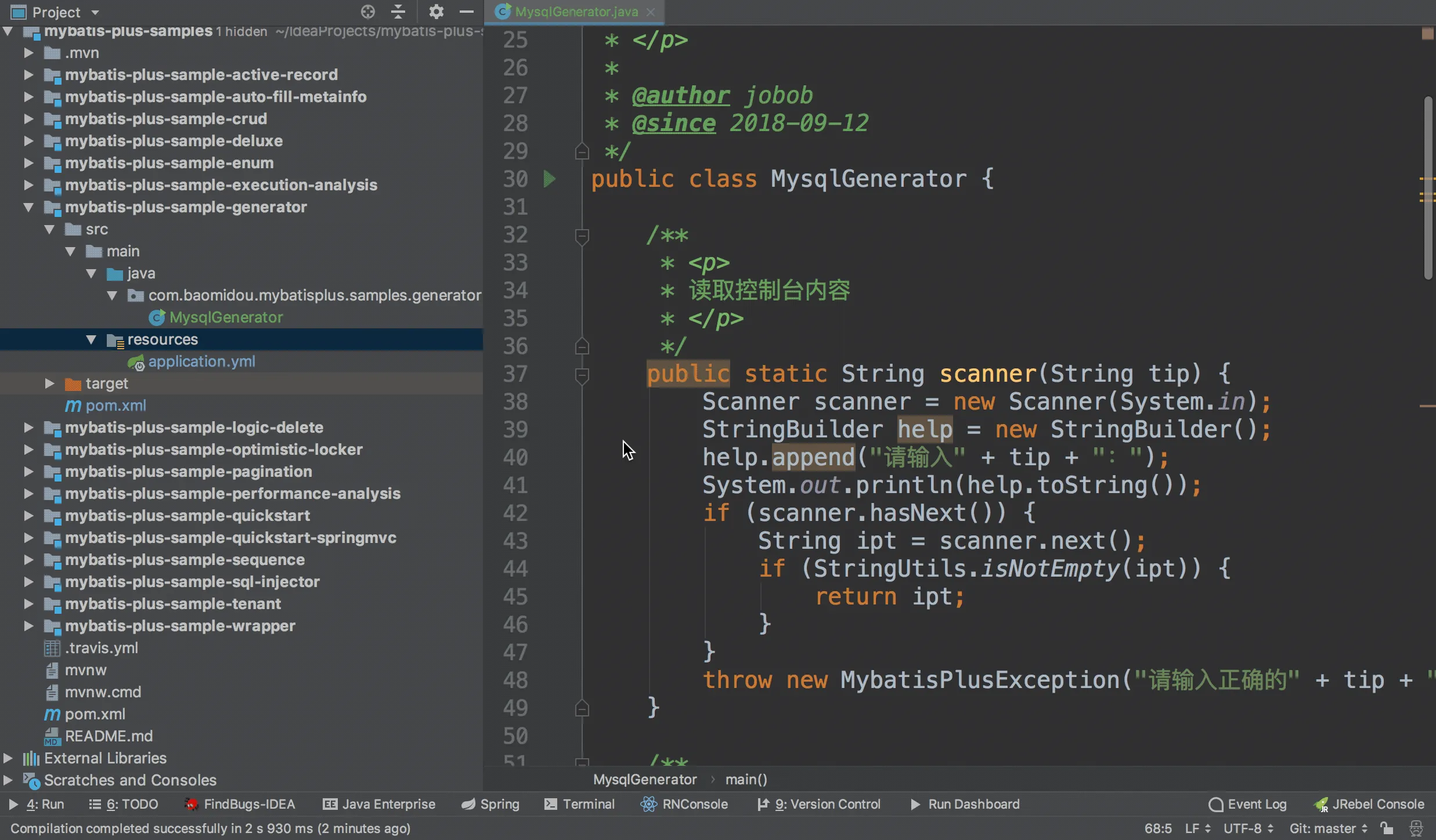
Maven#
1
2
3
4
5
6
7
8
9
10
11
12
13
14
15
16
17
18
19
20
21
22
23
24
25
26
27
28
29
30
31
32
33
| <dependencies>
<dependency>
<groupId>org.springframework.boot</groupId>
<artifactId>spring-boot-starter-test</artifactId>
<scope>test</scope>
</dependency>
<!--mybatis-plus的springboot支持-->
<dependency>
<groupId>com.baomidou</groupId>
<artifactId>mybatis-plus-boot-starter</artifactId>
<version>3.1.1</version>
</dependency>
<!-- 代码生成器 -->
<dependency>
<groupId>com.baomidou</groupId>
<artifactId>mybatis-plus-generator</artifactId>
<version>3.1.1</version>
</dependency>
<dependency>
<groupId>org.springframework.boot</groupId>
<artifactId>spring-boot-starter-freemarker</artifactId>
</dependency>
<!--mysql驱动-->
<dependency>
<groupId>mysql</groupId>
<artifactId>mysql-connector-java</artifactId>
<version>5.1.47</version>
</dependency>
<dependency>
<groupId>org.slf4j</groupId>
<artifactId>slf4j-log4j12</artifactId>
</dependency>
</dependencies>
|
1
2
3
4
5
6
7
8
9
10
11
12
13
14
15
16
17
18
19
20
21
22
23
24
25
26
27
28
29
30
31
32
33
34
35
36
37
38
39
40
41
42
43
44
45
46
47
48
49
50
51
52
53
54
55
56
57
58
59
60
61
62
63
64
65
66
67
68
69
70
71
72
73
74
75
76
77
78
79
80
81
82
83
84
85
86
87
88
89
90
91
92
93
94
95
96
97
98
99
100
101
102
103
104
105
106
107
108
109
110
111
112
113
114
115
116
117
118
119
120
121
122
123
124
125
126
127
128
129
130
131
132
133
134
135
136
137
138
139
140
| package org.hong.generator;
import com.baomidou.mybatisplus.core.exceptions.MybatisPlusException;
import com.baomidou.mybatisplus.core.toolkit.StringPool;
import com.baomidou.mybatisplus.core.toolkit.StringUtils;
import com.baomidou.mybatisplus.generator.AutoGenerator;
import com.baomidou.mybatisplus.generator.InjectionConfig;
import com.baomidou.mybatisplus.generator.config.*;
import com.baomidou.mybatisplus.generator.config.po.TableInfo;
import com.baomidou.mybatisplus.generator.config.rules.NamingStrategy;
import com.baomidou.mybatisplus.generator.engine.FreemarkerTemplateEngine;
import java.util.ArrayList;
import java.util.List;
import java.util.Scanner;
// 演示例子,执行 main 方法控制台输入模块表名回车自动生成对应项目目录中
public class CodeGenerator {
/**
* <p>
* 读取控制台内容
* </p>
*/
public static String scanner(String tip) {
Scanner scanner = new Scanner(System.in);
StringBuilder help = new StringBuilder();
help.append("请输入" + tip + ":");
System.out.println(help.toString());
if (scanner.hasNext()) {
String ipt = scanner.next();
if (StringUtils.isNotBlank(ipt)) {
return ipt;
}
}
throw new MybatisPlusException("请输入正确的" + tip + "!");
}
public static void main(String[] args) {
// 代码生成器
AutoGenerator mpg = new AutoGenerator();
// 全局配置
GlobalConfig gc = new GlobalConfig();
String projectPath = System.getProperty("user.dir");
gc.setOutputDir(projectPath + "/src/main/java");
gc.setAuthor("jobob");
gc.setOpen(false);
// gc.setSwagger2(true); 实体属性 Swagger2 注解
mpg.setGlobalConfig(gc);
// 数据源配置
DataSourceConfig dsc = new DataSourceConfig();
dsc.setUrl("jdbc:mysql://localhost:3306/mp?useUnicode=true&useSSL=false&characterEncoding=utf8");
// dsc.setSchemaName("public");
dsc.setDriverName("com.mysql.jdbc.Driver");
dsc.setUsername("root");
dsc.setPassword("1234");
mpg.setDataSource(dsc);
// 包配置
PackageConfig pc = new PackageConfig();
pc.setModuleName(scanner("模块名"));
pc.setParent("org.hong");
mpg.setPackageInfo(pc);
// 自定义配置
InjectionConfig cfg = new InjectionConfig() {
@Override
public void initMap() {
// to do nothing
}
};
// 如果模板引擎是 freemarker
String templatePath = "/templates/mapper.xml.ftl";
// 如果模板引擎是 velocity
// String templatePath = "/templates/mapper.xml.vm";
// 自定义输出配置
List<FileOutConfig> focList = new ArrayList<>();
// 自定义配置会被优先输出
focList.add(new FileOutConfig(templatePath) {
@Override
public String outputFile(TableInfo tableInfo) {
// 自定义输出文件名 , 如果你 Entity 设置了前后缀、此处注意 xml 的名称会跟着发生变化!!
return projectPath + "/src/main/resources/mapper/" + pc.getModuleName()
+ "/" + tableInfo.getEntityName() + "Mapper" + StringPool.DOT_XML;
}
});
/*
cfg.setFileCreate(new IFileCreate() {
@Override
public boolean isCreate(ConfigBuilder configBuilder, FileType fileType, String filePath) {
// 判断自定义文件夹是否需要创建
checkDir("调用默认方法创建的目录,自定义目录用");
if (fileType == FileType.MAPPER) {
// 已经生成 mapper 文件判断存在,不想重新生成返回 false
return !new File(filePath).exists();
}
// 允许生成模板文件
return true;
}
});
*/
cfg.setFileOutConfigList(focList);
mpg.setCfg(cfg);
// 配置模板
TemplateConfig templateConfig = new TemplateConfig();
// 配置自定义输出模板
//指定自定义模板路径,注意不要带上.ftl/.vm, 会根据使用的模板引擎自动识别
// templateConfig.setEntity("templates/entity2.java");
// templateConfig.setService();
// templateConfig.setController();
templateConfig.setXml(null);
mpg.setTemplate(templateConfig);
// 策略配置
StrategyConfig strategy = new StrategyConfig();
strategy.setNaming(NamingStrategy.underline_to_camel);
strategy.setColumnNaming(NamingStrategy.underline_to_camel);
strategy.setSuperEntityClass("你自己的父类实体,没有就不用设置!");
strategy.setEntityLombokModel(true);
strategy.setRestControllerStyle(true);
// 公共父类
strategy.setSuperControllerClass("你自己的父类控制器,没有就不用设置!");
// 写于父类中的公共字段
strategy.setSuperEntityColumns("id");
strategy.setInclude(scanner("表名,多个英文逗号分割").split(","));
strategy.setControllerMappingHyphenStyle(true);
strategy.setTablePrefix(pc.getModuleName() + "_");
mpg.setStrategy(strategy);
mpg.setTemplateEngine(new FreemarkerTemplateEngine());
mpg.execute();
}
}
|