# Day-10-IO流
File类#
【1】对文件进行操作:
 1
 2
 3
 4
 5
 6
 7
 8
 9
10
11
12
13
14
15
16
17
18
19
20
21
22
23
24
25
26
27
28
29
| //将文件封装为一个File类的对象:
File f = new File("E:\\test.txt");
File f2 = new File("E:/test.txt");
//File.separator属性帮我们获取当前操作系统的路径拼接符号
File f3 = new File("E:"+File.separator+"test.txt"); //建议使用这种
//常用方法:
System.out.println("文件是否可读"+f.canRead());
System.out.println("文件是否可写"+f.canWrite());
System.out.println("文件的名字"+f.getName());
System.out.println("文件上级目录"+f.getParent());
System.out.println("是否是一个目录"+f.isDirectory());
System.out.println("是否是一个文件"+f.isFile());
System.out.println("是否隐藏"+f.isHidden());
System.out.println("文件大小"+f.length());
System.out.println("文件是否存在"+f.exists());
if (f.exists()){
f.delete();
}else {
f.createNewFile();
}
System.out.println(f == f2); //比较两个对象的地址
System.out.println(f.equals(f2)); //比较两个对象对应的文件的路径
//跟路径相关的
System.out.println("绝对路径"+f.getAbsolutePath());
System.out.println("相对路径"+f.getPath());
//toString的效果永远是 相对路径
System.out.println(f.toString());
|
【2】对目录进行操作:
 1
 2
 3
 4
 5
 6
 7
 8
 9
10
11
12
13
14
15
16
17
18
| File f2 = new File("d:\\a\\b\\c");
//创建目录:
f2.mkdir(); //创建单层目录
f2.mkdirs(); //创建多层目录
//删除:如果是删除目录的话,只会删除一层,并且前提:这层目录是空的,里面没有内容,如果内容就不会被删除
f2.delete();
//查看
String[] list = f2.list(); //文件夹下目录/文件对应的名字的数组
for (String s:list){
System.out.println(s);
}
File[] files = f2.listFiles();
for (File file:files){
System.out.println(file.getName()+","+file.getAbsolutePath());
}
}
|
IO流#
I/O:Input/Output的缩写,用于处理设备之间的数据的传输。
【1】形象理解:IO流当作一根“管”:
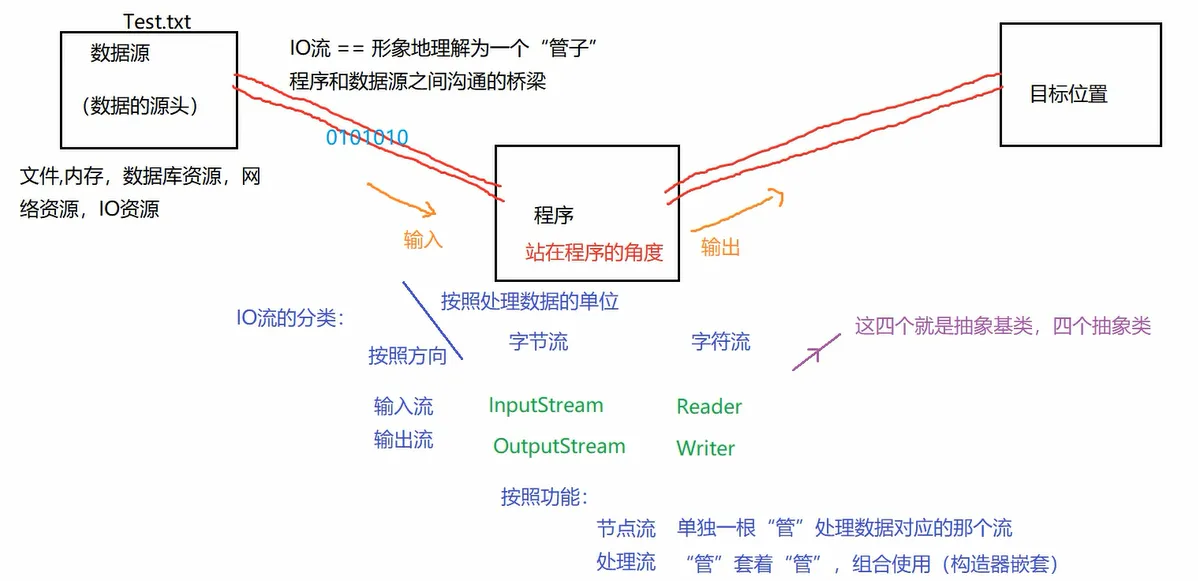
【2】IO流的体系结构:

【3】利用FileReader,FileWriter完成文件复制
逐个字符读取:
 1
 2
 3
 4
 5
 6
 7
 8
 9
10
11
12
13
14
15
16
17
18
19
20
21
22
23
24
25
26
27
28
| package com.zy.io1;
import java.io.File;
import java.io.FileNotFoundException;
import java.io.FileReader;
import java.io.IOException;
/**
* @Auther: 赵羽
* @Description: com.zy.io1
* @version: 1.0
*/
public class Test1 {
public static void main(String[] args) throws IOException {
//创建一个File类的对象
File f = new File("E:\\test.txt");
//创建一个FileReader的流的对象
FileReader fr = new FileReader(f);
//读取动作
int r = fr.read();
while (r!=-1){
System.out.println((char) r);
r = fr.read();
}
//关闭流
fr.close();
}
}
|
多个字符读取:
 1
 2
 3
 4
 5
 6
 7
 8
 9
10
11
12
13
14
15
16
17
18
19
20
21
22
23
24
25
26
27
28
29
30
| package com.zy.io1;
import java.io.File;
import java.io.FileReader;
import java.io.IOException;
/**
* @Auther: 赵羽
* @Description: com.zy.io1
* @version: 1.0
*/
public class Test2 {
public static void main(String[] args) throws IOException {
//创建一个File类的对象
File f = new File("E:\\test.txt");
//创建一个FileReader的流的对象
FileReader fr = new FileReader(f);
//读取动作
char[] ch = new char[5];
int len = fr.read(ch);
while (len!=-1){
for (int i = 0; i < len; i++) {
System.out.println(ch[i]);
}
len = fr.read(ch);
}
//关闭流
fr.close();
}
}
|
逐个字符写入:
 1
 2
 3
 4
 5
 6
 7
 8
 9
10
11
12
13
14
15
16
17
18
19
20
21
22
23
24
25
26
| package com.zy.io1;
import java.io.File;
import java.io.FileWriter;
import java.io.IOException;
/**
* @Auther: 赵羽
* @Description: com.zy.io1
* @version: 1.0
*/
public class Test3 {
public static void main(String[] args) throws IOException {
//创建一个File类的对象
File f = new File("E:\\demo.txt");
//创建一个FileReader的流的对象
FileWriter fw = new FileWriter(f);
//输出动作
String str = "hello你好呀";
for (int i = 0; i < str.length(); i++) {
fw.write(str.charAt(i));
}
//关闭流:
fw.close();
}
}
|
发现:
如果目标文件不存在的话,那么会自动创建此文件。
如果目标文件存在的话: new FileWriter(f)相当于对源文件进行覆盖操作。
new FileWriter(f,false)相当于对源文件进行覆盖操作。不是追加。
new FileWriter(f,true)对原来的文件进行追加,而不是覆盖。
多个字符写入:
 1
 2
 3
 4
 5
 6
 7
 8
 9
10
11
12
13
14
15
16
17
18
19
20
21
22
23
24
25
26
27
| package com.zy.io1;
import java.io.File;
import java.io.FileWriter;
import java.io.IOException;
/**
* @Auther: 赵羽
* @Description: com.zy.io1
* @version: 1.0
*/
public class Test4 {
public static void main(String[] args) throws IOException {
//创建一个File类的对象
File f = new File("E:\\demo.txt");
//创建一个FileReader的流的对象
FileWriter fw = new FileWriter(f,true);
//输出动作
String str = "dadghge";
char[] chars = str.toCharArray();
fw.write(chars);
//关闭流:
fw.close();
}
}
|
综合操作:
 1
 2
 3
 4
 5
 6
 7
 8
 9
10
11
12
13
14
15
16
17
18
19
20
21
22
23
24
25
26
27
28
29
30
31
32
33
34
35
36
37
38
39
40
41
42
43
44
| package com.zy.io1;
import java.io.*;
/**
* @Auther: 赵羽
* @Description: com.zy.io1
* @version: 1.0
*/
public class Test5 {
public static void main(String[] args) throws IOException {
//1.有一个源文件
File f1 = new File("E:\\test.txt");
//2.有一个目标文件
File f2 = new File("E:\\demo.txt");
//3.输入操作
FileReader fr = new FileReader(f1);
//4.输出操作
FileWriter fw = new FileWriter(f2);
//5.复制操作
//方式一:逐个字符复制
/*
int n = fr.read();
while (n!=-1){
fw.write(n);
n = fr.read();
}
*/
//方式二:多个字符复制 利用缓冲字符数组
char[] ch = new char[5];
int len = fr.read(ch);
while (len!=-1){
fw.write(ch,0,len);
len = fr.read(ch);
}
//6.关闭流
fw.close();
fr.close();
}
}
|
文本文件: .txt .java .c .cpp —》建议使用字符流操作
非文本文件: .jpg .mp3 .mp4 .doc .ppt —》建议使用字节流操作
异常处理:
 1
 2
 3
 4
 5
 6
 7
 8
 9
10
11
12
13
14
15
16
17
18
19
20
21
22
23
24
25
26
27
28
29
30
31
32
33
34
35
36
37
38
39
40
41
42
43
44
45
46
47
48
49
50
51
52
53
54
55
56
| package com.zy.io1;
import java.io.*;
/**
* @Auther: 赵羽
* @Date: 2021/2/21 - 02 - 21 - 18:49
* @Description: com.zy.io1
* @version: 1.0
*/
public class Test6 {
public static void main(String[] args) {
//1.有一个源文件
File f1 = new File("E:\\test.txt");
//2.有一个目标文件
File f2 = new File("E:\\demo.txt");
//3.输入操作
FileReader fr = null;
try {
fr = new FileReader(f1);
} catch (FileNotFoundException e) {
e.printStackTrace();
}
//4.输出操作
FileWriter fw = null;
try {
fw = new FileWriter(f2);
//5.复制操作
char[] ch = new char[5];
int len = fr.read(ch);
while (len!=-1){
fw.write(ch,0,len);
len = fr.read(ch);
}
} catch (IOException e) {
e.printStackTrace();
}finally {
//6.关闭流
try {
if (fw!=null){ //防止空指针异常
fw.close();
}
} catch (IOException e) {
e.printStackTrace();
}
try {
if (fr!=null){ //防止空指针异常
fr.close();
}
} catch (IOException e) {
e.printStackTrace();
}
}
}
}
|
【4】FileInputStream、FileOutputStream
利用字节流读取文本文件
 1
 2
 3
 4
 5
 6
 7
 8
 9
10
11
12
13
14
15
16
17
18
19
20
21
22
23
24
25
26
27
28
29
30
31
32
| package com.zy.io2;
import java.io.File;
import java.io.FileInputStream;
import java.io.FileNotFoundException;
import java.io.IOException;
/**
* @Auther: 赵羽
* @Description: com.zy.io2
* @version: 1.0
*/
public class Test1 {
public static void main(String[] args) throws IOException {
//功能:利用字节流将文件中内容读到程序中来:
File f = new File("E:\\test.txt");
FileInputStream fis = new FileInputStream(f);
/*
* 文件是utf-8进行存储的,所以英文字符 底层实际占用1个字节
* 但是中文字符 底层实际占用3个字节。
*如果文件是文本文件,那么就不要使用字节流读取了,建议使用字符流。
*
* */
int n = fis.read();
while (n!=-1){
System.out.println(n);
n =fis.read();
}
fis.close();
}
}
|
利用字节流读取非文本文件
 1
 2
 3
 4
 5
 6
 7
 8
 9
10
11
12
13
14
15
16
17
18
19
20
21
22
23
24
25
26
27
28
| package com.zy.io2;
import java.io.File;
import java.io.FileInputStream;
import java.io.FileNotFoundException;
import java.io.IOException;
/**
* @Auther: 赵羽
* @Description: com.zy.io2
* @version: 1.0
*/
public class Test1 {
public static void main(String[] args) throws IOException {
//功能:利用字节流将文件中内容读到程序中来:
File f = new File("E:\\test.jpg");
FileInputStream fis = new FileInputStream(f);
int count =0;
int n = fis.read();
while (n!=-1){
count++;
System.out.println(n);
n =fis.read();
}
System.out.println("count"+count)
fis.close();
}
}
|
利用字节类型的缓冲数组读取:
 1
 2
 3
 4
 5
 6
 7
 8
 9
10
11
12
13
14
15
16
17
18
19
20
21
22
23
24
25
26
27
28
29
30
| package com.zy.io2;
import sun.java2d.pipe.BufferedTextPipe;
import java.io.File;
import java.io.FileInputStream;
import java.io.IOException;
/**
* @Auther: 赵羽
* @Description: com.zy.io2
* @version: 1.0
*/
public class Test2 {
public static void main(String[] args) throws IOException {
//功能:利用字节流将文件中内容读到程序中来:
File f = new File("E:\\test.jpg");
FileInputStream fis = new FileInputStream(f);
//利用缓冲数组:
byte[] b = new byte[1024*6];
int len = fis.read(b);
while (len!=-1){
for (int i = 0; i < len; i++) {
System.out.println(b[i]);
}
len = fis.read(b);
}
fis.close();
}
}
|
FileInputStream、FileOutputStream完成非文本文件的复制
 1
 2
 3
 4
 5
 6
 7
 8
 9
10
11
12
13
14
15
16
17
18
19
20
21
22
23
24
25
| package com.zy.io2;
import java.io.*;
/**
* @Auther: 赵羽
* @Description: com.zy.io2
* @version: 1.0
*/
public class Test3 {
public static void main(String[] args) throws IOException {
//功能:完成图片的复制:
File f1 = new File("E:\\cat.jpg");
File f2 = new File("E:\\cat1.jpg");
FileInputStream fis = new FileInputStream(f1);
FileOutputStream fos = new FileOutputStream(f2);
int n = fis.read();
while (n!=-1){
fos.write(n);
n = fis.read();
}
fos.close();
fis.close();
}
}
|
利用缓冲数组完成
 1
 2
 3
 4
 5
 6
 7
 8
 9
10
11
12
13
14
15
16
17
18
19
20
21
22
23
24
25
| package com.zy.io2;
import java.io.*;
/**
* @Auther: 赵羽
* @Description: com.zy.io2
* @version: 1.0
*/
public class Test4 {
public static void main(String[] args) throws IOException {
File f1 = new File("E:\\cat.jpg");
File f2 = new File("E:\\cat2.jpg");
FileInputStream fis = new FileInputStream(f1);
FileOutputStream fos = new FileOutputStream(f2);
byte[] b = new byte[1024*8];
int len = fis.read();
while (len!=-1){
fos.write(b);
len = fis.read();
}
fos.close();
fis.close();
}
}
|
【5】缓冲字节流(处理流)
 1
 2
 3
 4
 5
 6
 7
 8
 9
10
11
12
13
14
15
16
17
18
19
20
21
22
23
24
25
26
27
28
29
30
31
32
33
34
35
36
| package com.zy.io2;
import java.io.*;
/**
* @Auther: 赵羽
* @Description: com.zy.io2
* @version: 1.0
*/
public class Test5 {
public static void main(String[] args) throws IOException {
File f1 = new File("E:\\cat.jpg");
File f2 = new File("E:\\cat3.jpg");
FileInputStream fis = new FileInputStream(f1);
FileOutputStream fos = new FileOutputStream(f2);
//功能加强,在FiLeInputStream外面套一个管:BufferedInputStream:
BufferedInputStream bis = new BufferedInputStream(fis);
//功能加强,在FileoutputStream外面套一个管: BufferedoutputStream:;
BufferedOutputStream bos = new BufferedOutputStream(fos);
byte[] b = new byte[1024 * 8];
int len = bis.read(b);
while (len!=-1){
bos.write(b,0,len);
len = bis.read(b);
}
//如果处理流包裹着节点流的话,那么其实只要关闭高级流(处理流),那么里面的字节流也会随之被关闭。
bos.close();
bis.close();
/*fos.close();
fis.close();*/
}
}
|
【6】缓冲字符流(处理流)
 1
 2
 3
 4
 5
 6
 7
 8
 9
10
11
12
13
14
15
16
17
18
19
20
21
22
23
24
25
26
27
28
29
30
31
32
33
34
35
36
37
38
39
40
41
42
43
44
| package com.zy.io2;
import java.io.*;
/**
* @Auther: 赵羽
* @Description: com.zy.io2
* @version: 1.0
*/
public class Test6 {
public static void main(String[] args) throws IOException {
File f1 = new File("E:\\test.txt");
File f2 = new File("E:\\demo.txt");
FileReader fr = new FileReader(f1);
FileWriter fw = new FileWriter(f2);
BufferedReader br = new BufferedReader(fr);
BufferedWriter bw = new BufferedWriter(fw);
//方式一:逐个字符读取
int n = br.read();
while (n!=-1){
bw.write(n);
n = br.read();
}
//方式二:利用缓冲数组
char[] ch = new char[30];
int len = br.read(ch);
while (len!=-1){
bw.write(ch,0,len);
len = br.read();
}
//方式三:读取String
String s = br.readLine(); //每次读取文本文件中一行,返回字符串
while (s!=null){
bw.write(s);
//在每次文件中应该再写出一个换行:
bw.newLine(); //新起一行
s = br.readLine();
}
bw.close();
br.close();
}
}
|
【7】转换流
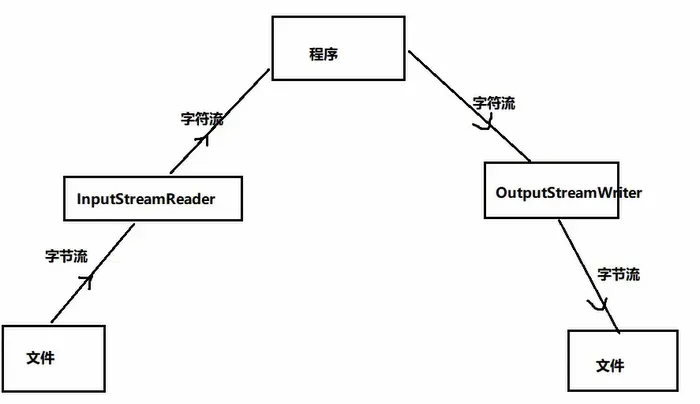
转换流:作用:将字节流和字符流进行转换。
lnputStreamReader :字节输入流—》字符的输入流
OutputStreamWriter :字符输出流–》字节的输出流
 1
 2
 3
 4
 5
 6
 7
 8
 9
10
11
12
13
14
15
16
17
18
19
20
21
22
23
24
25
26
27
| package com.zy.io2;
import java.io.*;
/**
* @Auther: 赵羽
* @Description: com.zy.io2
* @version: 1.0
*/
public class Test7 {
public static void main(String[] args) throws IOException {
File f = new File("E:\\test.txt");
FileInputStream fis = new FileInputStream(f);
//加入一个转换流,将字节流转换为字符流:(转换流属于一个处理流)
//将字节转换为字符的时候,需要指定一个编码,这个编码跟文件本身的编码格式统一
//如果编码格式不统一的话,那么在控制台上展示的效果就会出现乱码
InputStreamReader isr = new InputStreamReader(fis, "utf-8");
char[] ch = new char[20];
int len = isr.read(ch);
while (len!=-1){
System.out.println(new String(ch, 0, len));
len = isr.read(ch);
}
isr.close();
}
}
|
 1
 2
 3
 4
 5
 6
 7
 8
 9
10
11
12
13
14
15
16
17
18
19
20
21
22
23
24
25
26
27
28
29
30
31
32
| package com.zy.io2;
import java.io.*;
/**
* @Auther: 赵羽
* @Description: com.zy.io2
* @version: 1.0
*/
public class Test8 {
public static void main(String[] args) throws IOException {
File f = new File("E:\\test.txt");
File f2 = new File("E:\\demo.txt");
FileInputStream fis = new FileInputStream(f);
InputStreamReader isr = new InputStreamReader(fis, "utf-8");
FileOutputStream fos = new FileOutputStream(f2);
OutputStreamWriter ows = new OutputStreamWriter(fos,"gbk");
char[] ch = new char[20];
int len = isr.read(ch);
while (len!=-1){
ows.write(ch,0,len);
len = isr.read(ch);
}
ows.close();
isr.close();
}
}
|
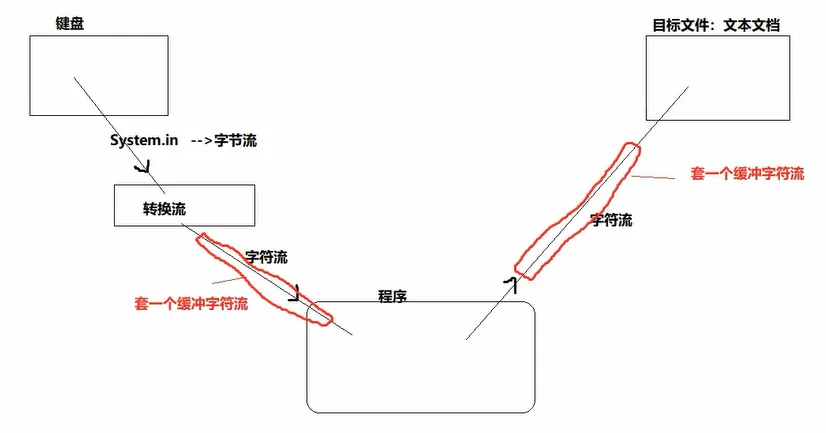
练习:键盘录入内容输出到文件中
 1
 2
 3
 4
 5
 6
 7
 8
 9
10
11
12
13
14
15
16
17
18
19
20
21
22
23
24
25
26
27
28
29
30
31
32
33
34
35
36
37
| package com.zy.io2;
import java.io.*;
/**
* @Auther: 赵羽
* @Description: com.zy.io2
* @version: 1.0
*/
public class Test9 {
public static void main(String[] args) throws IOException {
//1.先准备输入方向:
//键盘录入:
InputStream in = System.in; //属于字节流
//字节流---》字符流
InputStreamReader isr = new InputStreamReader(in);
//在isr外面再套一个缓冲流
BufferedReader br = new BufferedReader(isr);
//2.再准备输出方向:
//准备目标文件
File f = new File("E:\\demo2.txt");
FileWriter fw = new FileWriter(f);
BufferedWriter bw = new BufferedWriter(fw);
//3.开始动作
String s = br.readLine();
while (!s.equals("exit")){
bw.write(s);
bw.newLine(); //文件中换行
s = br.readLine();
}
//4.关闭流
bw.close();
br.close();
}
}
|
【8】数据流
数据流:用来操作基本数据类型和字符串的
DatalnputStream:将文件中存储的基本数据类型和字符串写入内存的变量中
DataOutputStream:将内存中的基本数据类型和字符串的变量写出文件中
利用DataOutputStream向外写出变量:
 1
 2
 3
 4
 5
 6
 7
 8
 9
10
11
12
13
14
15
16
17
18
19
20
21
22
23
24
| package com.zy.io3;
import java.io.*;
/**
* @Auther: 赵羽
* @Description: com.zy.io3
* @version: 1.0
*/
public class Test1 {
public static void main(String[] args) throws IOException {
/*File f = new File("E:\\demo2.txt");
FileOutputStream fos = new FileOutputStream(f);
DataOutputStream dos = new DataOutputStream(fos);*/
DataOutputStream dos = new DataOutputStream(new FileOutputStream(new File("E:\\demo2.txt")));
//向外将变量写到文件中去:
dos.writeUTF("你好");
dos.writeBoolean(false);
dos.writeDouble(45.2);
dos.writeInt(25);
dos.close();
}
}
|
利用DataInputStream读取变量:
 1
 2
 3
 4
 5
 6
 7
 8
 9
10
11
12
13
14
15
16
17
18
19
| package com.zy.io3;
import java.io.*;
/**
* @Auther: 赵羽
* @Description: com.zy.io3
* @version: 1.0
*/
public class Test2 {
public static void main(String[] args) throws IOException {
DataInputStream dis = new DataInputStream(new FileInputStream(new File("E:\\demo2.txt")));
System.out.println(dis.readUTF());
System.out.println(dis.readBoolean());
System.out.println(dis.readDouble());
System.out.println(dis.readInt());
dis.close();
}
}
|
【9】对象流
对象流:ObjectlnputStream,ObjectlnputStream用于存储和读取基本数据类型数据或对象的处理流。它的强大之处就是可以把Java中的对象写入到数据源中,也能把对象从数据源中还原回来。
序列化和反序列化:
objectOutputStream类∶把内存中的Java对象转换成平台无关的二进制数据,从而允许把这种二进制数据持久地保存在磁盘上,或通过网络将这种二进制数据传输到另一个网络节点。—-》序列化
用ObjectlnputStream类:当其它程序获取了这种二进制数据,就可以恢复成原来的Java对象。—-》反序列化
操作字符串类型
 1
 2
 3
 4
 5
 6
 7
 8
 9
10
11
12
13
14
15
16
17
18
19
20
21
22
| package com.zy.io3;
import java.io.*;
/**
* @Auther: 赵羽
* @Description: com.zy.io3
* @version: 1.0
*/
public class Test3 {
public static void main(String[] args) throws IOException, ClassNotFoundException {
//写入
ObjectOutputStream oos = new ObjectOutputStream(new FileOutputStream(new File("E:\\demo3.txt")));
oos.writeObject("你好");
oos.close();
//读取
ObjectInputStream ois = new ObjectInputStream(new FileInputStream(new File("E:\\demo3.txt")));
String s = (String)(ois.readObject());
System.out.println(s);
ois.close();
}
}
|
操作自定义类的对象:
 1
 2
 3
 4
 5
 6
 7
 8
 9
10
11
12
13
14
15
16
17
18
19
20
21
22
23
24
25
26
27
28
29
30
31
32
33
34
35
| package com.zy.io4;
/**
* @Auther: 赵羽
* @Description: com.zy.io4
* @version: 1.0
*/
public class Person {
private String name;
private int age;
public String getName() {
return name;
}
public void setName(String name) {
this.name = name;
}
public int getAge() {
return age;
}
public void setAge(int age) {
this.age = age;
}
public Person() {
}
public Person(String name, int age) {
this.name = name;
this.age = age;
}
}
|
测试类:
 1
 2
 3
 4
 5
 6
 7
 8
 9
10
11
12
13
14
15
16
17
18
19
20
21
22
23
24
25
26
| package com.zy.io4;
import java.io.File;
import java.io.FileOutputStream;
import java.io.IOException;
import java.io.ObjectOutputStream;
/**
* @Auther: 赵羽
* @Description: com.zy.io4
* @version: 1.0
*/
public class Test1 {
public static void main(String[] args) throws IOException {
//序列化:将内存中对象 ----》文件:
//有一个对象
Person p = new Person("张三", 18);
//有对象流
ObjectOutputStream oos = new ObjectOutputStream(new FileOutputStream(new File("E:\\demo4.txt")));
//向外写:
oos.writeObject(p);
//关闭流
oos.close();
}
}
|
发生异常:

出现异常的原因:
你想要序列化的那个对象对应的类,必须要实现一个接口:
 1
 2
 3
 4
 5
 6
 7
 8
 9
10
11
12
13
14
15
16
17
18
19
20
21
22
23
24
25
26
27
28
29
30
31
32
33
34
35
36
37
| package com.zy.io4;
import java.io.Serializable;
/**
* @Auther: 赵羽
* @Description: com.zy.io4
* @version: 1.0
*/
public class Person implements Serializable { //添加接口
private String name;
private int age;
public String getName() {
return name;
}
public void setName(String name) {
this.name = name;
}
public int getAge() {
return age;
}
public void setAge(int age) {
this.age = age;
}
public Person() {
}
public Person(String name, int age) {
this.name = name;
this.age = age;
}
}
|
结果需要反序列查看:
 1
 2
 3
 4
 5
 6
 7
 8
 9
10
11
12
13
14
15
16
17
| package com.zy.io4;
import java.io.*;
/**
* @Auther: 赵羽
* @Description: com.zy.io4
* @version: 1.0
*/
public class Test2 {
public static void main(String[] args) throws IOException, ClassNotFoundException {
ObjectInputStream ois = new ObjectInputStream(new FileInputStream(new File("E:\\demo4.txt")));
Person p = (Person)(ois.readObject());
System.out.println(p);
ois.close();
}
}
|
serialVersionUID:
凡是实现Serializable接口(标识接口)的类都有一个表示序列化版本标识符的静态变量:
private static final long serialVersionUID;
serialNersionUID用来表明类的不同版本间的兼容性。简言之,其目的是以序列化对象进行版本控制,有关各版本反序加化时是否兼容。
如果类没有显示定义这个静态变量,它的值是Java运行时环境根据类的内部细节自动生成的。若类的实例变量做了修改,serialVersionUID可能发生变化。故建议,显式声明。
简单来说,Java的序列化机制是通过在运行时判断类的serialNersionUID来验证版本一致性的。在进行反序列化时,JVM会把传来的字节流中的serialVersionUlID与本地相应实体类的serialVersionUID进行比较,如果相同就认为是一致的,可以进行反序列化,否则就会出现序列化版本不一致的异常。(lnvalidCastException)
添加toString
 1
 2
 3
 4
 5
 6
 7
 8
 9
10
11
12
13
14
15
16
17
18
19
20
21
22
23
24
25
26
27
28
29
30
31
32
33
34
35
36
37
38
39
40
41
42
43
44
45
| package com.zy.io4;
import java.io.Serializable;
/**
* @Auther: 赵羽
* @Description: com.zy.io4
* @version: 1.0
*/
public class Person implements Serializable {
private String name;
private int age;
public String getName() {
return name;
}
public void setName(String name) {
this.name = name;
}
public int getAge() {
return age;
}
public void setAge(int age) {
this.age = age;
}
public Person() {
}
public Person(String name, int age) {
this.name = name;
this.age = age;
}
@Override
public String toString() {
return "Person{" +
"name='" + name + '\'' +
", age=" + age +
'}';
}
}
|
再次测试:
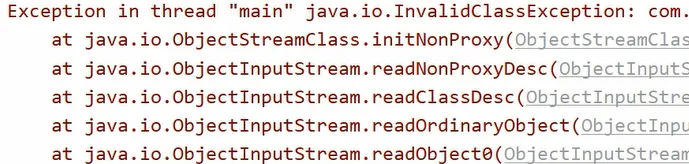
出现异常原因:

解决:给这个类加入一个序列号: serialVersionUID

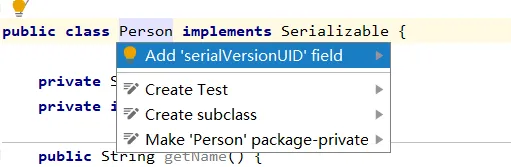
IDEA中配置序列化版本号:

alt+enter自动生成序列化版本号:

(1)被序列化的类的内部的所有属性,必须是可序列化的(基本数据类型都是可序列化的。
(2) static,transient修饰的属性不可以被序列化。